TRON 2 · DOCUMENTATION
Environment & modes
Excerpted from the supplied English User Manual v1.4. Chinese editorial corrections and later confirmations may not be synchronized. Check the Chinese reference where the two differ.
Configuration: dual-arm details apply only to dual-arm/mobile dual-arm robots. Older instructions differ in power timing, light names and homing motion; check the operational guidance and version notes on this page.
3.1 Operating Environment Requirements
- Electromagnetic interference: Avoid operating near interference sources such as high-voltage power lines and mobile base stations.
- Wi-Fi signal interference: Avoid co-channel interference. If interference occurs, turn off other nearby wireless signal sources.
- Line-of-sight control: Keep the robot within visual range at all times and maintain a safety distance of at least 1 m from obstacles, crowds, water surfaces, etc.
- Temperature range: -5°C to 40°C. Outdoor use is prohibited in severe weather such as heavy fog, rain, snow, or thunderstorms.
- Water and dust protection: The robot is not waterproof or dustproof. Avoid humid, sandy, or dusty environments.
- Ground requirements: Use on flat ground with high friction. Operate cautiously if the robot must be used on smooth surfaces.
- Safety assistance: In Sole/wheeled configurations, use a tether to avoid falls during remote control and early development testing.
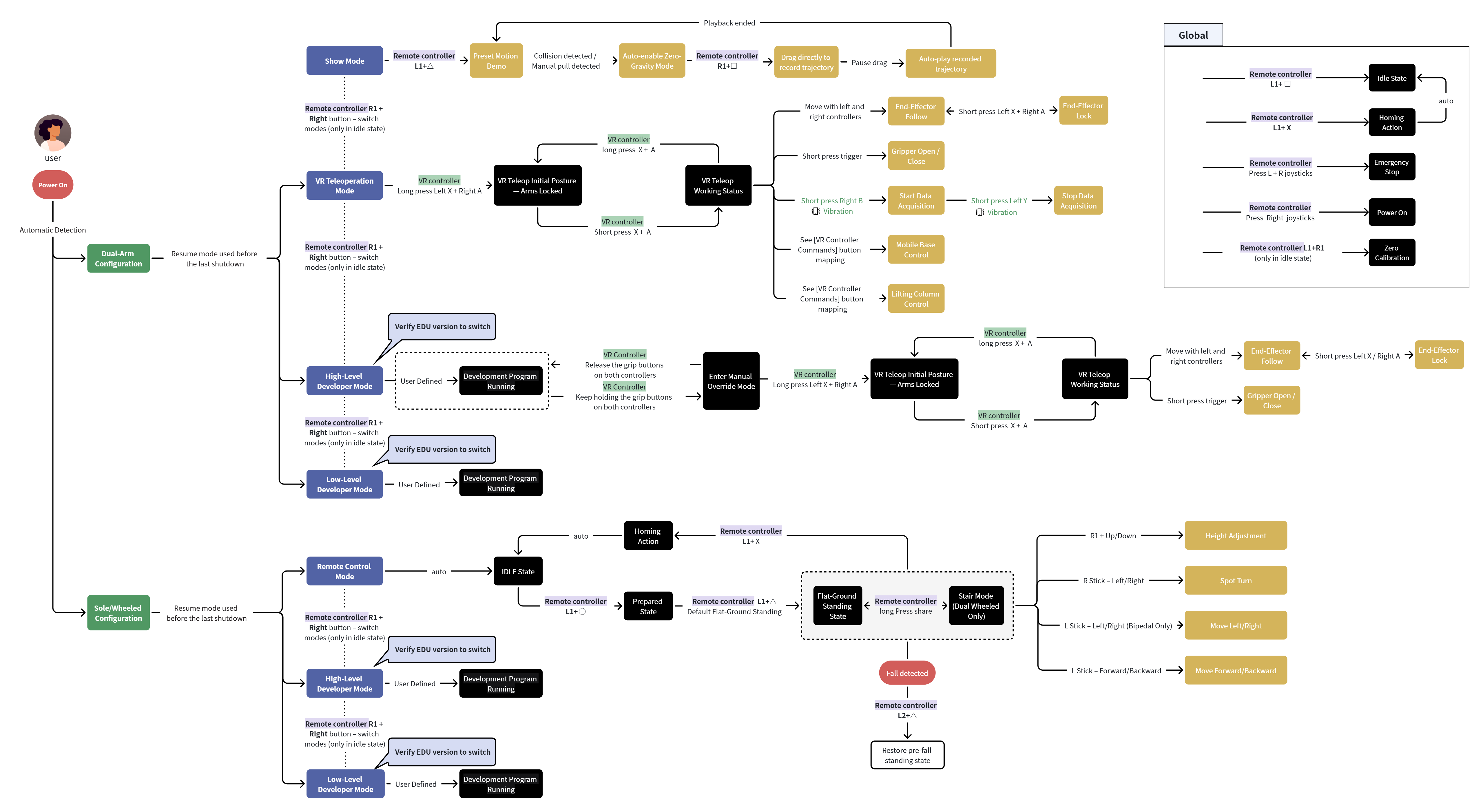
3.2 Mode Descriptions and Usage Flow
| Configuration | Mode | Mode Description |
| Dual-Arms Configuration | Show Mode | Provides Preset Motion Demo, Drag-to-Record Trajectory, and Playback of Recorded Trajectory. |
| VR Teleoperation Mode | In this mode, a VR device is used to remotely operate the robot, mainly for teleoperation, data collection, etc. | |
| High-Level Development Mode (EDU version only) | Allows calls to high-level application development interfaces to control robot motion based on built-in motion-control algorithms, such as moveJ and servoP. | |
| Low-Level Development Mode (EDU version only) | Allows calls to low-level development interfaces to directly control joints. | |
| Sole/Wheeled Configuration | Remote-Control Mode | The user controls robot motion with the remote controller, including forward/backward/left/right movement, turning, height adjustment, etc. |
| High-Level Development Mode (EDU version only) | Calls high-level application development interfaces to control robot motion based on built-in motion-control algorithms, including forward/backward/left/right movement, turning, height adjustment, etc. | |
| Low-Level Development Mode (EDU version only) | Calls low-level motion-control interfaces outside the built-in motion-control algorithms to directly control joints. |
Dual-arm configuration details · 3.1 Operating Environment Requirements
- Electromagnetic interference: Do not operate near interference sources such as high-voltage power lines or cellular base stations.
- Wi-Fi interference: Avoid co-channel interference. If interference occurs, turn off other nearby wireless signal sources.
- Line-of-sight operation: Keep the robot in sight at all times and maintain a safety distance of at least 1 m from obstacles, people, and bodies of water.
- Temperature range: Operate between -5 °C and 40 °C. Do not use the robot outdoors in heavy fog, rain, snow, thunderstorms, or other severe weather.
- Water and dust protection: The robot is not waterproof or dustproof. Keep it away from humid, sandy, and dusty environments.
- Floor requirements: Operate on a flat, high-friction surface. Use caution on smooth surfaces.
- Safety assistance: For the Bipedal/Wheeled-Legged Configuration, use a safety tether during initial Remote-Control Mode or Developer Mode operation to help prevent falls.
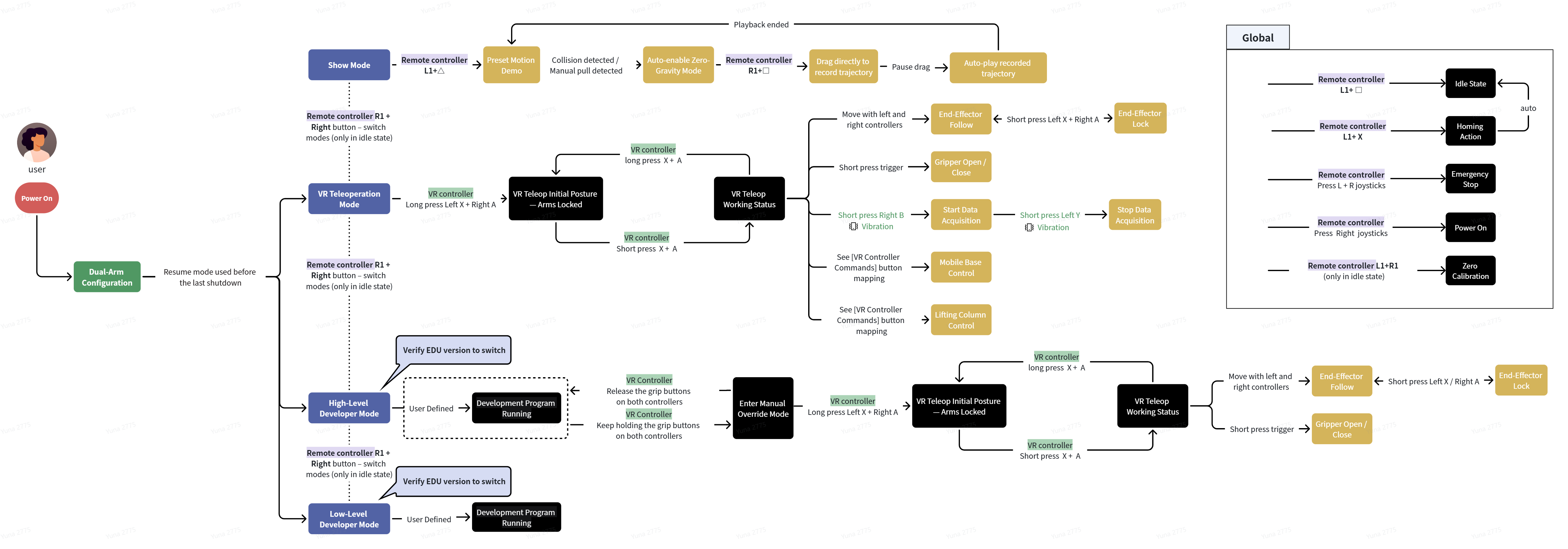
Dual-arm configuration details · 3.2 Mode Descriptions and Operating Flow
| Configuration | Mode | Description |
|---|---|---|
| Dual-Arms Configuration | Preset Motion Demo | For initial capability checks after unboxing. Use the Remote Controller to demonstrate the arms' reach and joint ranges. After the demonstration, the robot enters Demo Idle with both arms hanging naturally. |
| VR Teleoperation Mode | Uses a VR device to teleoperate the robot, primarily for data collection. At the default zero position, the upper arms hang beside the body and the forearms extend forward at 90 degrees. | |
| High-Level Development Mode | Available only on the EDU version. Supports high-level interfaces such as moveJ and servoP. The Remote Controller displays High-Level Development, and the Status Indicator is steady cyan. | |
| Low-Level Development Mode | Available only on the EDU version. Supports direct joint control through low-level Python and C++ interfaces with all control nodes disabled. The Remote Controller displays Low-Level Development, and the Status Indicator is green. |
NEXTVR teleoperation