TRON 2 · 使用与开发
环境准备与通信架构
先确认 EDU 开发能力、机器人型号、网络和开发电脑,再完成第一次通信。
准备与适用条件
| 版本 | 修订日期 | 修改人员 | 修改内容 |
|---|---|---|---|
| V1.0 | 20260415 | damon | 初稿 |
| V1.1 | 20260726 | damon | 主控制器 V2.1.24 升级更新及此前错误修正 |
| V1.2 | 20260729 | damon | 针对主控 V2.2.11升级的的信息更新 -增加柔顺控制开关与参数设置接口 -增加升降支架位置控制接口 |
1 SDK 概述
名词解释:
- 底层运动控制接口:在底层开发模式下,您可以使用 python、C++ 等调用机器人底层接口,实现例如直接控制关节运动等底层操作。
- 上层应用开发接口:在上层开发模式下,您可以基于原厂内置运控算法从而控制机器人运动完成任务,例如双臂操作、机器人前后移动、机器人灯光管理等。
1.1 通讯架构图
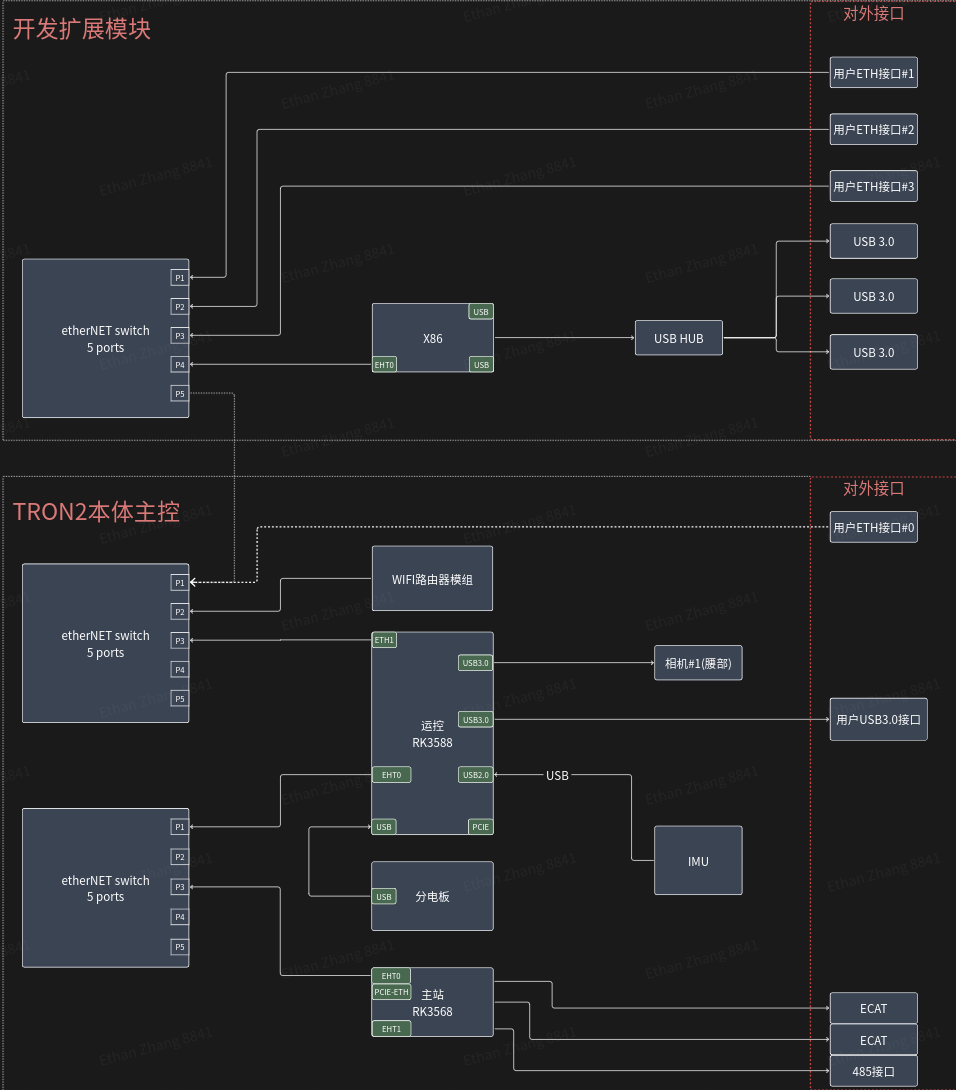
下图呈现了机器人本体通信架构组成及交互关系。运控电脑部分涵盖运控算法节点和软件业务逻辑实现模块,通过 上层应用开发接口 和 底层运动控制开发接口 的数据通讯方式控制机器人本体的运动。机器人本体由数据交换机、主站及各类硬件组件构成,运控电脑负责协调各组件运行。
1.2 查看/设置机器人型号
在编译和运行控制算法及仿真器程序时,选择正确的机器人型号至关重要。
您可以通过查看机器人型号并将其设置到环境变量 ROBOT_TYPE 中,确保在不同任务中准确识别并应用相应的机器人构型。以下是查看和配置机器人型号的步骤。
- 请选择并连接您机器人的 Wi-Fi 热点,密码为:
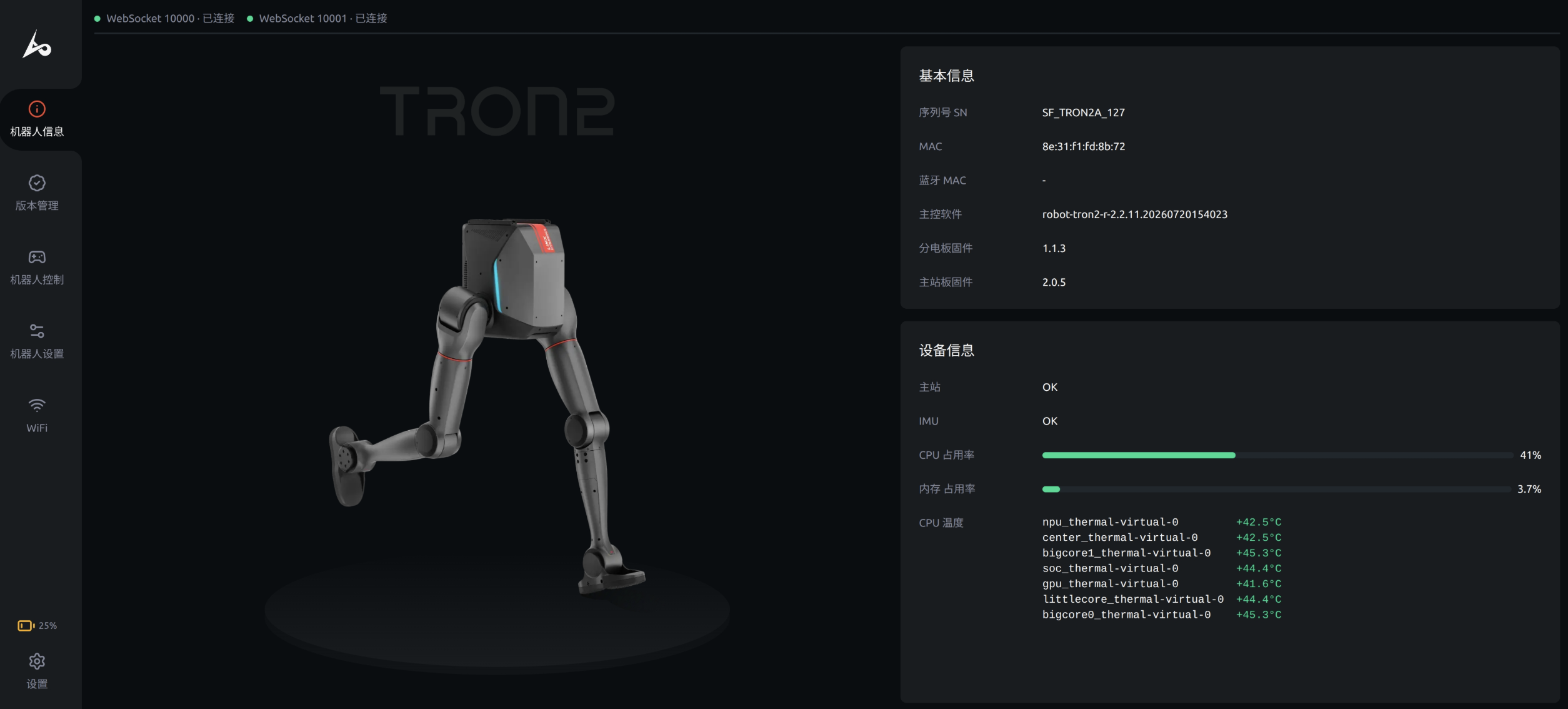
12345678在浏览器中输入http://10.192.1.2:8080可以进入“机器人信息页”,并查看机器人信息。如下图所示,页面中显示的 SN (序列号) 为 WF_TRON2A_001,其中 WF_TRON2A 是机器人型号类型。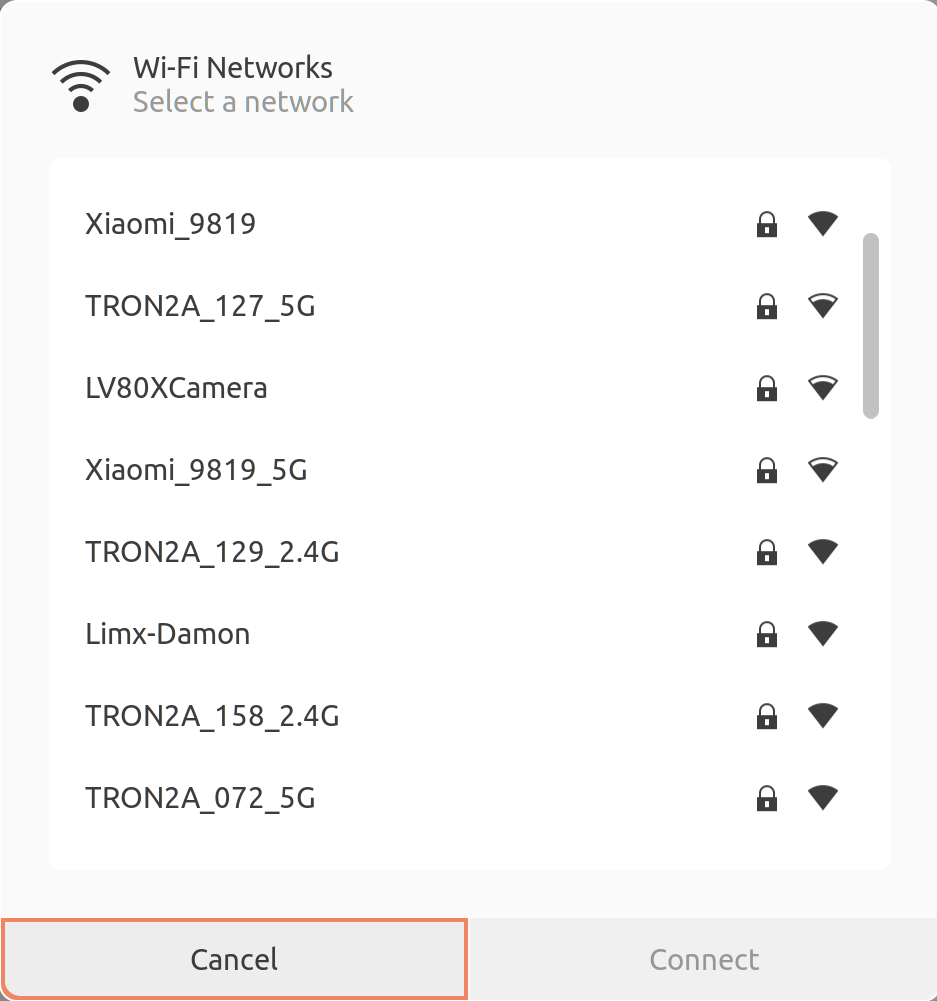
- 设置机器人型号:打开 Bash 终端,输入以下 Shell 命令来设置机器人型号。这样在编译和运行 RL 训练、控制算法以及仿真器程序时,算法将能获取到正确的机器人型号信息。
echo 'export ROBOT_TYPE=WF_TRON2A' >> ~/.bashrc && source ~/.bashrc
1.3 开发拓展模块电脑
开发拓展模块内置电脑主要用于开发机器人相关算法及应用程序。您可以通过 WiFi或有线网络连接到机器人本体系统从而登录到开发者电脑,具体步骤如下:
- 请选择并连接您机器人的 Wi-Fi 热点,密码为:
12345678- 通过 SSH 登录开发者电脑系统
- 登录地址为:
10.192.1.4 - 登录密码为:
123456 - 在终端中输入以下命令(首次连接需确认命令):
ssh guest@10.192.1.4 - 开发者电脑系统配置:
- 操作系统:Ubuntu 22.04 LTS
- ROS2:系统默认安装ROS2 Humble版本机器人系统
- ROS1:系统默认安装ROS1 Noetic 版本机器人系统
- 登录地址为:
- 通过 SSH 登录开发者电脑系统
websocket_client.cpp 实现
#include <iostream>
#include <atomic>
#include <string>
#include <thread>
#include <chrono>
#include <websocketpp/client.hpp>
#include <websocketpp/config/asio.hpp>
#include <nlohmann/json.hpp>
#include <boost/uuid/uuid.hpp>
#include <boost/uuid/uuid_generators.hpp>
#include <boost/uuid/uuid_io.hpp>

using json = nlohmann::json;
using websocketpp::client;
using websocketpp::connection_hdl;

// Replace this ACCID value with your robot's actual serial number (SN)
static std::string ACCID = "";

// WebSocket client instance
static client<websocketpp::config::asio> ws_client;

// Atomic flag for graceful exit
static std::atomic<bool> should_exit(false);

// Connection handle for sending messages
static connection_hdl current_hdl;

// Generate dynamic GUID
static std::string generate_guid()
{
    boost::uuids::random_generator gen;
    boost::uuids::uuid u = gen();
    return boost::uuids::to_string(u);
}

// Send WebSocket request with title and data
static void send_request(const std::string& title, const json& data = json::object())
{
    json message;

    message["accid"] = ACCID;
    message["title"] = title;
    message["timestamp"] = std::chrono::duration_cast<std::chrono::milliseconds>(
                               std::chrono::system_clock::now().time_since_epoch())
                               .count();
    message["guid"] = generate_guid();
    message["data"] = data;

    std::string message_str = message.dump();

    ws_client.send(current_hdl, message_str, websocketpp::frame::opcode::text);
}

// Handle user commands
static void handle_commands()
{
    while (!should_exit)
    {
        std::string command;
        std::cout << "Enter command ('stand', 'walk', 'twist', 'sit', 'stair', 'stop', 'imu') or 'exit' to quit:" << std::endl;
        std::getline(std::cin, command);

        if (command == "exit")
        {
            should_exit = true;
            break;
        }
        else if (command == "stand")
        {
            send_request("request_stand_mode");
        }
        else if (command == "walk")
        {
            send_request("request_walk_mode");
        }
        else if (command == "twist")
        {
            float x, y, z;
            std::cout << "Enter x, y, z values:" << std::endl;
            std::cin >> x >> y >> z;
            std::cin.ignore();

            send_request("request_twist", {
                {"x", x},
                {"y", y},
                {"z", z}
            });
        }
        else if (command == "sit")
        {
            send_request("request_sitdown");
        }
        else if (command == "stair")
        {
            std::string enable;
            std::cout << "Enable stair mode (true/false):" << std::endl;
            std::cin >> enable;
            std::cin.ignore();

            send_request("request_stair_mode", {
                {"enable", enable == "true"}
            });
        }
        else if (command == "stop")
        {
            send_request("request_emgy_stop");
        }
        else if (command == "imu")
        {
            std::string enable;
            std::cout << "Enable IMU (true/false):" << std::endl;
            std::cin >> enable;
            std::cin.ignore();

            send_request("request_enable_imu", {
                {"enable", enable == "true"}
            });
        }
    }
}

// WebSocket open callback
static void on_open(connection_hdl hdl)
{
    std::cout << "Connected!" << std::endl;

    current_hdl = hdl;

    std::thread(handle_commands).detach();
}

// WebSocket message callback
static void on_message(connection_hdl hdl, client<websocketpp::config::asio>::message_ptr msg)
{
    json data = json::parse(msg->get_payload());

    if (data.contains("accid") && data["accid"].is_string() && ACCID.empty())
    {
        ACCID = data["accid"].get<std::string>();
    }

    std::cout << "Received: " << msg->get_payload() << std::endl;
}

// WebSocket close callback
static void on_close(connection_hdl hdl)
{
    std::cout << "Connection closed." << std::endl;
}

// Close WebSocket connection
static void close_connection(connection_hdl hdl)
{
    ws_client.close(hdl, websocketpp::close::status::normal, "Normal closure");
}

int main()
{
    ws_client.init_asio();

    ws_client.set_open_handler(&on_open);
    ws_client.set_message_handler(&on_message);
    ws_client.set_close_handler(&on_close);

    std::string server_uri = "ws://10.192.1.2:5000";

    websocketpp::lib::error_code ec;
    client<websocketpp::config::asio>::connection_ptr con = ws_client.get_connection(server_uri, ec);

    if (ec)
    {
        std::cout << "Error: " << ec.message() << std::endl;
        return 1;
    }

    connection_hdl hdl = con->get_handle();
    ws_client.connect(con);

    std::cout << "Press Ctrl+C to exit." << std::endl;

    ws_client.run();

    return 0;
}
继续阅读第一次通信 · 查看状态