Environment & architecture
Confirm EDU capabilities, robot model, network and development computer before the first connection.
Preparation & applicability
| Version | Revision Date | Modified By | Change Description |
|---|---|---|---|
| V1.0 | 20260415 | damon | Initial draft |
| V1.1 | 20260726 | damon | Upgrade update of main controller V2.1.24 and previous error corrections |
| V1.2 | 20260729 | damon | Information update for main controller V2.2.11 upgrade - Add compliance control switch and parameter setting interface - Add lifting bracket position control interface |
1 SDK Overview
Terminology:
- Low-Level Motion Control Interface: In low-level development mode, you can use the Python and C++ low-level APIs to perform operations such as direct joint control.
- High-Level Application Development Interface: In high-level development mode, you can use the manufacturer's built-in motion-control algorithms to perform tasks such as dual-arm manipulation, forward and backward locomotion, and robot lighting management.
1.1 Communication Architecture Diagram
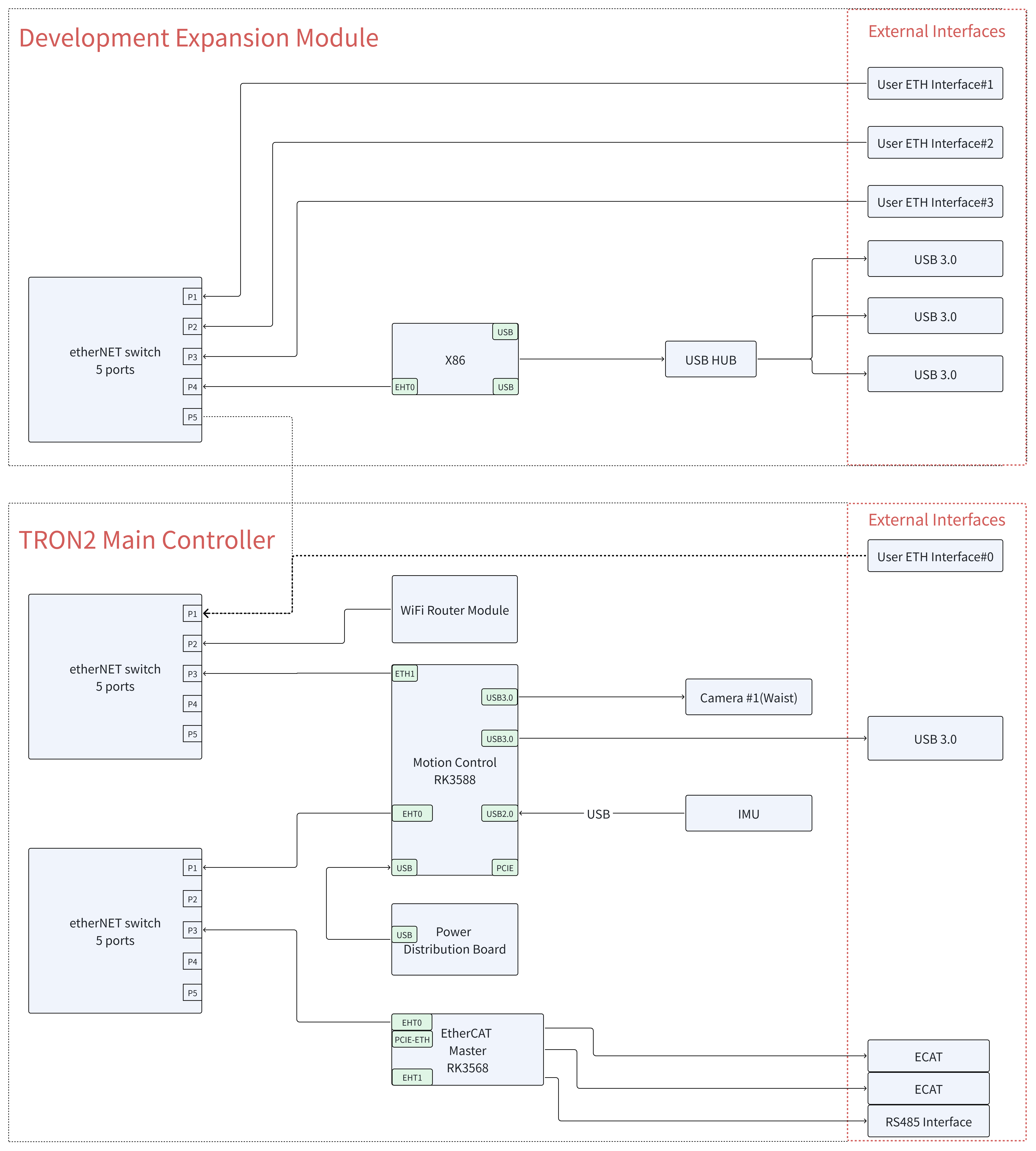
The following diagram shows the composition of the robot communication architecture and the interactions among its components. The motion-control computer contains motion-control algorithm nodes and application-logic modules, which communicate with the robot through the High-Level Application Development Interface and the Low-Level Motion Control Development Interface. The robot consists of a network switch, a main controller, and various hardware components. The motion-control computer coordinates the operation of these components.
1.2 View/Set the Robot Model
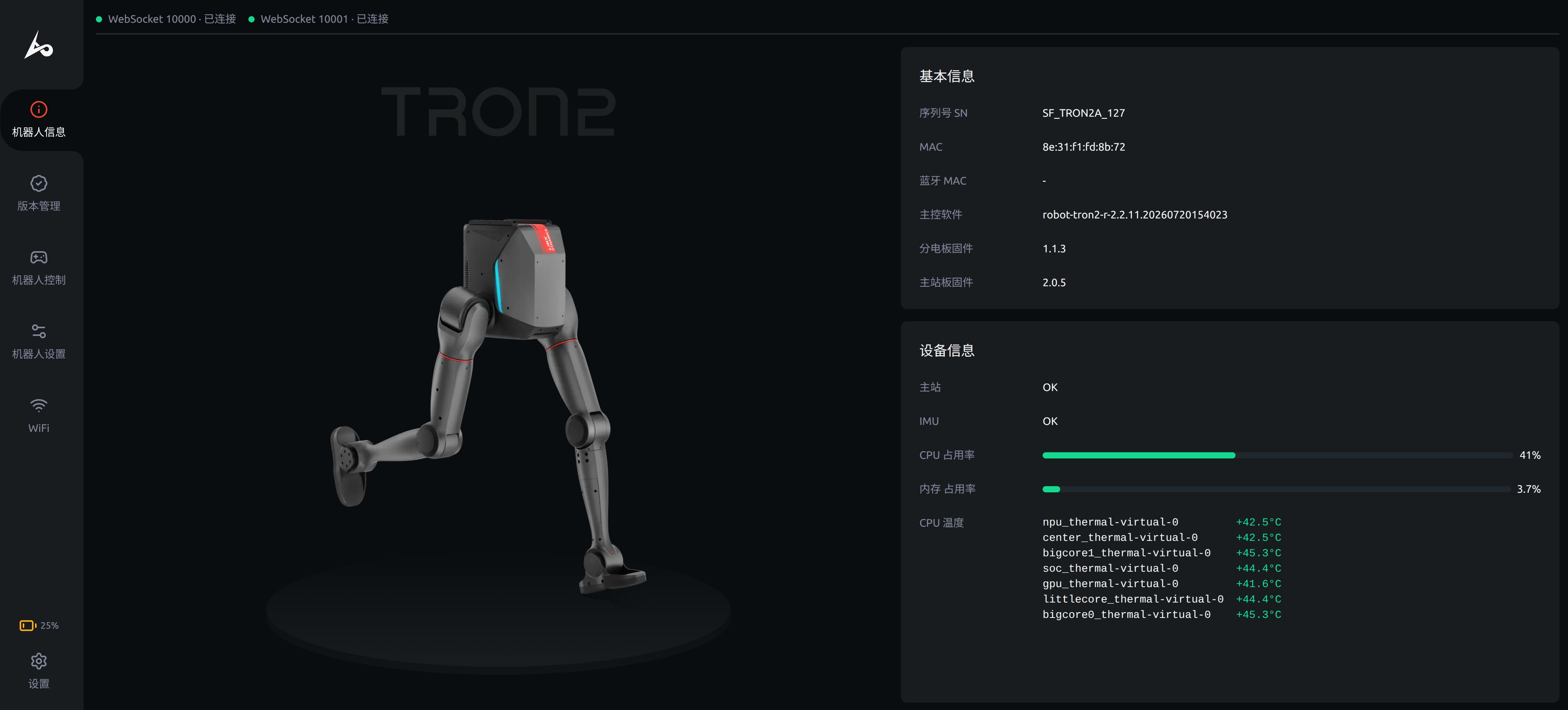
When compiling and running control algorithms and simulator programs, selecting the correct robot model is critical. You can check the robot model and assign it to the ROBOT_TYPE environment variable to ensure that the correct robot configuration is identified and used for different tasks. The following steps describe how to view and configure the robot model.
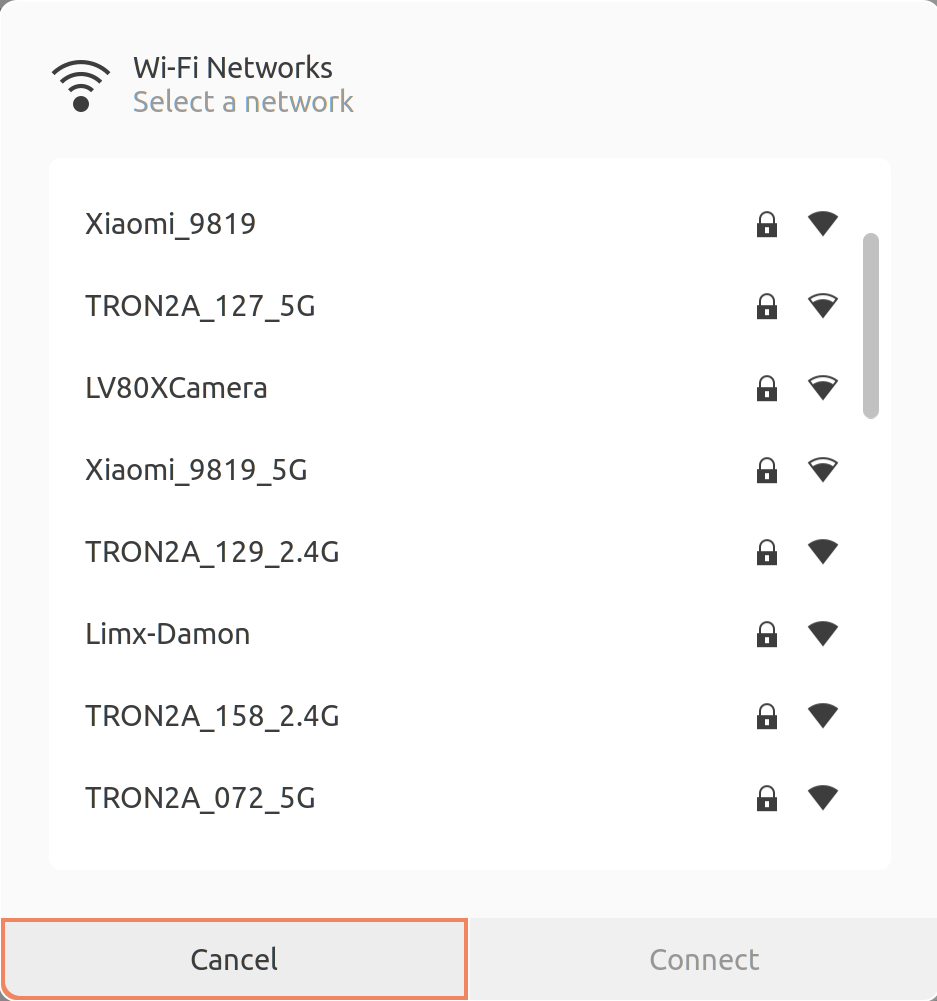
- Select and connect to your robot's Wi-Fi hotspot. The password is
12345678. Enterhttp://10.192.1.2:8080in a browser to open the "Robot Information" page. As shown below, the SN (serial number) isWF_TRON2A_001, whereWF_TRON2Ais the robot model.
- Set the robot model: open a Bash terminal and run the following command. The RL training, control-algorithm, and simulator programs can then obtain the correct robot model information during compilation and execution.
echo 'export ROBOT_TYPE=WF_TRON2A' >> ~/.bashrc && source ~/.bashrc
1.3 Development Expansion Module Computer
The computer built into the development expansion module is primarily used to develop robot-related algorithms and applications. You can connect to the robot's onboard system through Wi-Fi or a wired network and log in to the development computer as follows:
- Select and connect to your robot's Wi-Fi hotspot. The password is
12345678.- Log in to the development computer via SSH:
-
Login address:
10.192.1.4 -
Login password:
123456 -
Run the following command in a terminal. Confirm the host key when connecting for the first time:
ssh guest@10.192.1.4 -
Developer computer system configuration:
- Operating system: Ubuntu 22.04.6 LTS
- ROS 2: ROS 2 Humble is installed by default.
- ROS 1: ROS 1 Noetic is installed by default.
-
- Log in to the development computer via SSH:
Environment Setup
Using Ubuntu 22.04 as an example, install websocketpp, nlohmann/json and boost dependencies:
sudo apt-get install libboost-all-dev libwebsocketpp-dev nlohmann-json3-dev
Compile the Code
g++ -std=c++11 -o websocket_client websocket_client.cpp -lssl -lcrypto -lboost_system -lpthread
Run the Program
./websocket_client
websocket_client.cpp Implementation
#include <iostream>
#include <atomic>
#include <string>
#include <thread>
#include <chrono>
#include <websocketpp/client.hpp>
#include <websocketpp/config/asio.hpp>
#include <nlohmann/json.hpp>
#include <boost/uuid/uuid.hpp>
#include <boost/uuid/uuid_generators.hpp>
#include <boost/uuid/uuid_io.hpp>

using json = nlohmann::json;
using websocketpp::client;
using websocketpp::connection_hdl;

// Replace this value with the actual serial number (SN) of the robot.
static std::string ACCID = "";

// Replace it with the real IP address of the robot.
// Usually, for simulation, it is: 127.0.0.1
// For a physical robot, use 10.192.1.2
const std::string ROBOT_IP = "10.192.1.2";

// WebSocket client instance
static client<websocketpp::config::asio> ws_client;

// Atomic flag for graceful exit
static std::atomic<bool> should_exit(false);

// Connection handle for sending messages
static connection_hdl current_hdl;

// Generate dynamic GUID
static std::string generate_guid()
{
    boost::uuids::random_generator gen;
    boost::uuids::uuid u = gen();
    return boost::uuids::to_string(u);
}

// Send WebSocket request with title and data
static void send_request(const std::string &title, const json &data = json::object())
{
    json message;

    message["accid"] = ACCID;
    message["title"] = title;
    message["timestamp"] = std::chrono::duration_cast<std::chrono::milliseconds>(
                               std::chrono::system_clock::now().time_since_epoch())
                               .count();
    message["guid"] = generate_guid();
    message["data"] = data;

    std::string message_str = message.dump();

    ws_client.send(current_hdl, message_str, websocketpp::frame::opcode::text);
}

// Handle user commands
void handle_commands()
{
    std::cout << "Enter command ('movej', 'movep', 'light', 'stop') or 'exit' to quit:\n";

    while (!should_exit)
    {
        std::string command;
        std::cin >> command;

        if (command == "exit")
        {
            should_exit = true;
            return;
        }
        else if (command == "movej")
        {
            json data = {
                {"joint", {-0.5, 0.3, -0.2, 0.2, 0.2, 0.2, 0.2,
                           -0.5, -0.3, -0.2, 0.2, 0.2, 0.2, 0.2}},
                {"time", 2}};
            send_request("request_movej", data);
        }
        else if (command == "movep")
        {
            json data = {
                {"pos", {0.3, 0.2, -0.3, 1, 0, 0, 0, 1, 0, 0, 0, 1,
                         0.3, -0.2, -0.3, 1, 0, 0, 0, 1, 0, 0, 0, 1}},
                {"time", 2}};
            send_request("request_movep", data);
        }
        else if (command == "light")
        {
            send_request("request_light_effect", {{"effect", 1}});
        }
        else if (command == "stop")
        {
            send_request("request_emgy_stop");
        }

        std::this_thread::sleep_for(std::chrono::seconds(1));

        std::cout << "Enter command ('movej', 'movep', 'light', 'stop') or 'exit' to quit:\n";
    }
}

// WebSocket open callback
static void on_open(connection_hdl hdl)
{
    std::cout << "Connected!" << std::endl;

    current_hdl = hdl;

    std::thread(handle_commands).detach();
}

// WebSocket TCP initialization handler
static void on_tcp_init(connection_hdl hdl)
{
    auto con = ws_client.get_con_from_hdl(hdl);
    auto &socket = con->get_socket().lowest_layer();

    try
    {
        boost::system::error_code ec;

        const size_t sendBufferSize = 2 * 1024 * 1024;
        socket.set_option(websocketpp::lib::asio::socket_base::send_buffer_size(sendBufferSize), ec);

        if (ec)
        {
            printf("Failed to set send buffer size: %s", ec.message().c_str());
        }

        const size_t recvBufferSize = 2 * 1024 * 1024;
        socket.set_option(websocketpp::lib::asio::socket_base::receive_buffer_size(recvBufferSize), ec);

        if (ec)
        {
            printf("Failed to set receive buffer size: %s", ec.message().c_str());
        }

        socket.set_option(websocketpp::lib::asio::ip::tcp::no_delay(true), ec);

        if (ec)
        {
            printf("Failed to disable Nagle's algorithm: %s", ec.message().c_str());
        }
    }
    catch (const std::exception &e)
    {
        printf("Socket configuration exception: %s", e.what());
    }
}

// WebSocket message callback
static void on_message(connection_hdl hdl, client<websocketpp::config::asio>::message_ptr msg)
{
    json data = json::parse(msg->get_payload());

    if (data.contains("accid") && data["accid"].is_string() && ACCID.empty())
    {
        ACCID = data["accid"].get<std::string>();
    }

    if (msg->get_payload().find("notify_robot_info") == std::string::npos)
    {
        std::cout << "Received message: " << msg->get_payload() << std::endl;
    }
}

// WebSocket close callback
static void on_close(connection_hdl hdl)
{
    std::cout << "Connection closed." << std::endl;
}

// Close WebSocket connection
static void close_connection(connection_hdl hdl)
{
    ws_client.close(hdl, websocketpp::close::status::normal, "Normal closure");
}

int main()
{
    ws_client.init_asio();

    ws_client.set_access_channels(websocketpp::log::alevel::none);

    ws_client.set_open_handler(&on_open);
    ws_client.set_message_handler(&on_message);
    ws_client.set_close_handler(&on_close);
    ws_client.set_tcp_init_handler(&on_tcp_init);

    std::string server_uri = "ws://" + ROBOT_IP + ":5000";

    websocketpp::lib::error_code ec;
    client<websocketpp::config::asio>::connection_ptr con = ws_client.get_connection(server_uri, ec);

    if (ec)
    {
        std::cout << "Error: " << ec.message() << std::endl;
        return 1;
    }

    ws_client.connect(con);

    std::cout << "Press Ctrl+C to exit." << std::endl;

    ws_client.run();

    return 0;
}
Environment Setup
Using Ubuntu 22.04 and Python 3.10.4 as an example, install the following dependencies:
sudo apt install python3-dev python3-pip
pip3 install websocket-client
Run the Script
python3 websocket_client.py
websocket_client.py Implementation
import json
import uuid
import threading
import time
import websocket

# Replace this ACCID value with your robot's actual serial number (SN)
ACCID = None

# Replace it with the real IP address of the robot.
# for a real machine, it is: 10.192.1.2
ROBOT_IP = "10.192.1.2"

# Atomic flag for graceful exit
should_exit = False

# WebSocket client instance
ws_client = None

# Generate dynamic GUID
def generate_guid():
    return str(uuid.uuid4())

# Send WebSocket request with title and data
def send_request(title, data=None):
    global ACCID

    if data is None:
        data = {}

    message = {
        "accid": ACCID,
        "title": title,
        "timestamp": int(time.time() * 1000),
        "guid": generate_guid(),
        "data": data
    }

    message_str = json.dumps(message)

    if ws_client:
        ws_client.send(message_str)

# Handle user commands
def handle_commands():
    global should_exit

    while not should_exit:
        command = input("Enter command ('movej', 'movep', 'light', 'stop') or 'exit' to quit:\n")

        if command == "exit":
            should_exit = True
            break

        elif command == "movej":
            send_request("request_movej", {
                "joint": [
                    0,0,0,-1.6,0,0,0,0,0,0,-1.6,0,0,0
                ],
                "time": 5
            })
        elif command == "movep":
            send_request("request_movep", {
                "pos": [
                    0.5,  0.2, -0.3, 0.7, 0,  -0.7,  0,  0.5,-0.2, -0.3,  0.7,   0,  -0.7,  0
                ],
                "time": 5
            })

        elif command == "light":
            send_request("request_light_effect", {
                "effect": 1
            })

        elif command == "stop":
            send_request("request_emgy_stop", {})

# WebSocket on_open callback
def on_open(ws):
    print("Connected!")
    threading.Thread(target=handle_commands, daemon=True).start()

# WebSocket on_message callback
def on_message(ws, message):
    global ACCID

    root = json.loads(message)
    title = root.get("title", "")

    if ACCID is None:
        ACCID = root.get("accid", None)

    if title != "notify_robot_info":
        print(f"Received message: {message}")

# WebSocket on_close callback
def on_close(ws, close_status_code, close_msg):
    print("Connection closed.")

# Close WebSocket connection
def close_connection(ws):
    ws.close()

def main():
    global ws_client

    ws_client = websocket.WebSocketApp(
        f"ws://{ROBOT_IP}:5000",
        on_open=on_open,
        on_message=on_message,
        on_close=on_close
    )

    print("Press Ctrl+C to exit.")
    ws_client.run_forever()

if __name__ == "__main__":
    main()
Environment Setup
Using Ubuntu 20.04 as an example, install websocketpp, nlohmann/json and boost dependencies:
sudo apt-get install libboost-all-dev libwebsocketpp-dev nlohmann-json3-dev
Compile the Code
g++ -std=c++11 -o websocket_client websocket_client.cpp -lssl -lcrypto -lboost_system -lpthread
Run the Program
./websocket_client
websocket_client.cpp Implementation
#include <iostream>
#include <atomic>
#include <string>
#include <thread>
#include <chrono>
#include <websocketpp/client.hpp>
#include <websocketpp/config/asio.hpp>
#include <nlohmann/json.hpp>
#include <boost/uuid/uuid.hpp>
#include <boost/uuid/uuid_generators.hpp>
#include <boost/uuid/uuid_io.hpp>

using json = nlohmann::json;
using websocketpp::client;
using websocketpp::connection_hdl;

// Replace this ACCID value with your robot's actual serial number (SN)
static std::string ACCID = "";

// WebSocket client instance
static client<websocketpp::config::asio> ws_client;

// Atomic flag for graceful exit
static std::atomic<bool> should_exit(false);

// Connection handle for sending messages
static connection_hdl current_hdl;

// Generate dynamic GUID
static std::string generate_guid()
{
    boost::uuids::random_generator gen;
    boost::uuids::uuid u = gen();
    return boost::uuids::to_string(u);
}

// Send WebSocket request with title and data
static void send_request(const std::string& title, const json& data = json::object())
{
    json message;

    message["accid"] = ACCID;
    message["title"] = title;
    message["timestamp"] = std::chrono::duration_cast<std::chrono::milliseconds>(
                               std::chrono::system_clock::now().time_since_epoch())
                               .count();
    message["guid"] = generate_guid();
    message["data"] = data;

    std::string message_str = message.dump();

    ws_client.send(current_hdl, message_str, websocketpp::frame::opcode::text);
}

// Handle user commands
static void handle_commands()
{
    while (!should_exit)
    {
        std::string command;
        std::cout << "Enter command ('stand', 'walk', 'twist', 'sit', 'stair', 'stop', 'imu') or 'exit' to quit:" << std::endl;
        std::getline(std::cin, command);

        if (command == "exit")
        {
            should_exit = true;
            break;
        }
        else if (command == "stand")
        {
            send_request("request_stand_mode");
        }
        else if (command == "walk")
        {
            send_request("request_walk_mode");
        }
        else if (command == "twist")
        {
            float x, y, z;
            std::cout << "Enter x, y, z values:" << std::endl;
            std::cin >> x >> y >> z;
            std::cin.ignore();

            send_request("request_twist", {
                {"x", x},
                {"y", y},
                {"z", z}
            });
        }
        else if (command == "sit")
        {
            send_request("request_sitdown");
        }
        else if (command == "stair")
        {
            std::string enable;
            std::cout << "Enable stair mode (true/false):" << std::endl;
            std::cin >> enable;
            std::cin.ignore();

            send_request("request_stair_mode", {
                {"enable", enable == "true"}
            });
        }
        else if (command == "stop")
        {
            send_request("request_emgy_stop");
        }
        else if (command == "imu")
        {
            std::string enable;
            std::cout << "Enable IMU (true/false):" << std::endl;
            std::cin >> enable;
            std::cin.ignore();

            send_request("request_enable_imu", {
                {"enable", enable == "true"}
            });
        }
    }
}

// WebSocket open callback
static void on_open(connection_hdl hdl)
{
    std::cout << "Connected!" << std::endl;

    current_hdl = hdl;

    std::thread(handle_commands).detach();
}

// WebSocket message callback
static void on_message(connection_hdl hdl, client<websocketpp::config::asio>::message_ptr msg)
{
    json data = json::parse(msg->get_payload());

    if (data.contains("accid") && data["accid"].is_string() && ACCID.empty())
    {
        ACCID = data["accid"].get<std::string>();
    }

    std::cout << "Received: " << msg->get_payload() << std::endl;
}

// WebSocket close callback
static void on_close(connection_hdl hdl)
{
    std::cout << "Connection closed." << std::endl;
}

// Close WebSocket connection
static void close_connection(connection_hdl hdl)
{
    ws_client.close(hdl, websocketpp::close::status::normal, "Normal closure");
}

int main()
{
    ws_client.init_asio();

    ws_client.set_open_handler(&on_open);
    ws_client.set_message_handler(&on_message);
    ws_client.set_close_handler(&on_close);

    std::string server_uri = "ws://10.192.1.2:5000";

    websocketpp::lib::error_code ec;
    client<websocketpp::config::asio>::connection_ptr con = ws_client.get_connection(server_uri, ec);

    if (ec)
    {
        std::cout << "Error: " << ec.message() << std::endl;
        return 1;
    }

    connection_hdl hdl = con->get_handle();
    ws_client.connect(con);

    std::cout << "Press Ctrl+C to exit." << std::endl;

    ws_client.run();

    return 0;
}
Environment Setup
Using Ubuntu 20.04 as an example, install the following dependencies:
sudo apt install python3-dev python3-pip
pip3 install websocket-client
Run the Script
python3 websocket_client.py
websocket_client.py Implementation
import json
import uuid
import threading
import time
import websocket


# Replace this ACCID value with your robot's actual serial number (SN)
ACCID = None

# Atomic flag for graceful exit
should_exit = False

# WebSocket client instance
ws_client = None


# Generate dynamic GUID
def generate_guid():
    return str(uuid.uuid4())


# Send WebSocket request with title and data
def send_request(title, data=None):
    global ACCID
    global ws_client

    if data is None:
        data = {}

    # Create message structure with necessary fields
    message = {
        "accid": ACCID,
        "title": title,
        "timestamp": int(time.time() * 1000),
        "guid": generate_guid(),
        "data": data
    }

    message_str = json.dumps(message)

    # Send the message through WebSocket if client is connected
    if ws_client:
        ws_client.send(message_str)


# Handle user commands
def handle_commands():
    global should_exit

    while not should_exit:
        command = input(
            "Enter command ('stand', 'walk', 'twist', 'sit', 'stair', 'stop', 'imu') or 'exit' to quit:\n"
        )

        if command == "exit":
            should_exit = True
            break

        elif command == "stand":
            send_request("request_stand_mode")

        elif command == "walk":
            send_request("request_walk_mode")

        elif command == "twist":
            # Get twist values from user
            x = float(input("Enter x value: "))
            y = float(input("Enter y value: "))
            z = float(input("Enter z value: "))

            # Send twist command at 30 Hz for 1 second
            for _ in range(30):
                send_request("request_twist", {
                    "x": x,
                    "y": y,
                    "z": z
                })
                time.sleep(1 / 30)

        elif command == "sit":
            send_request("request_sitdown")

        elif command == "stair":
            # Get stair mode enable flag from user
            enable = input("Enable stair mode (true/false): ").strip().lower() == "true"
            send_request("request_stair_mode", {
                "enable": enable
            })

        elif command == "stop":
            send_request("request_emgy_stop")

        elif command == "imu":
            # Get IMU enable flag from user
            enable = input("Enable IMU (true/false): ").strip().lower() == "true"
            send_request("request_enable_imu", {
                "enable": enable
            })


# WebSocket on_open callback
def on_open(ws):
    print("Connected!")

    # Start handling commands in a separate thread
    threading.Thread(target=handle_commands, daemon=True).start()


# WebSocket on_message callback
def on_message(ws, message):
    global ACCID

    root = json.loads(message)
    ACCID = root.get("accid", None)

    print(f"Received message: {message}")


# WebSocket on_close callback
def on_close(ws, close_status_code, close_msg):
    print("Connection closed.")


# Close WebSocket connection
def close_connection(ws):
    ws.close()


def main():
    global ws_client

    # Create WebSocket client instance
    ws_client = websocket.WebSocketApp(
        "ws://10.192.1.2:5000",
        on_open=on_open,
        on_message=on_message,
        on_close=on_close
    )

    # Run WebSocket client loop
    print("Press Ctrl+C to exit.")
    ws_client.run_forever()


if __name__ == "__main__":
    main()