High-level · common protocol
3 High-Level Application Development Interface
3.1 Overview
In High-Level Developer Mode, the robot receives client requests through WebSocket port 5000. These requests can command the robot to stand up, sit down, or walk. WebSocket establishes a persistent, real-time connection between the robot and the client, enabling fast and efficient transmission of control commands and data.
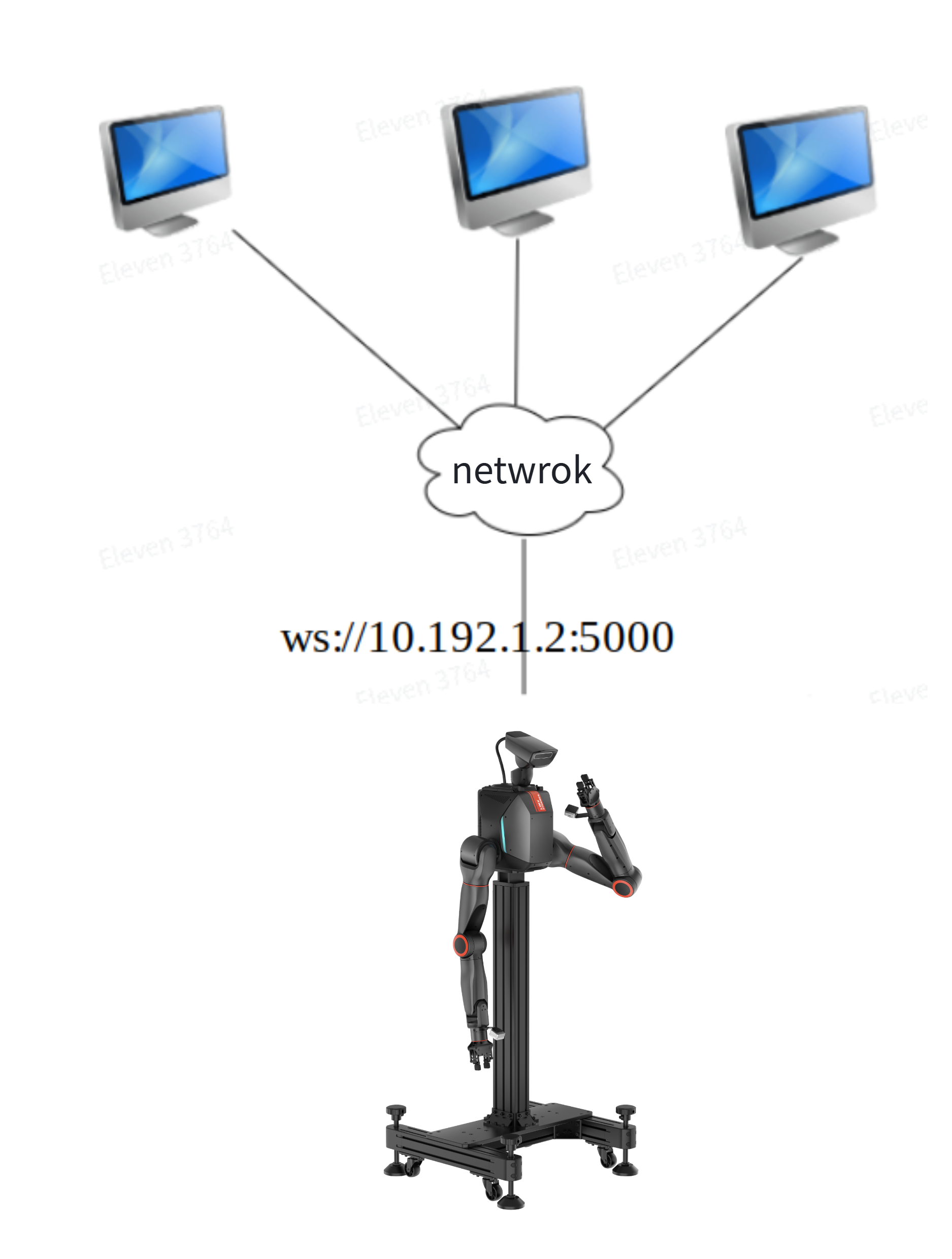
3.2 Communication Protocol Format
When the robot receives client commands through WebSocket, it exchanges information in JSON format. WebSocket is a full-duplex communication protocol that establishes a real-time, low-latency connection between the client and server, making it especially suitable for applications that require frequent interaction. JSON provides a concise, readable structure and offers cross-platform and cross-language compatibility. Together, WebSocket and JSON support a wide range of devices and systems while improving development flexibility and maintainability.
- The request data format contains the following fields:
accid: robot serial number; replace it with your robot's serial number;title: command name prefixed withrequest_;timestamp: command transmission timestamp, in milliseconds;guid: unique command identifier used to distinguish requests. For a synchronous interface, the same value must be returned in theguidfield of the correspondingresponse_xxxmessage. The client can compare the responseguidwith the requestguidto determine whether command execution is complete;data: stores the data content of the request command. Multiple subfields may be included as needed, to store the data required by the request command, such as action parameters or text content to be sent;- Example:
{
  "accid": "WF_TRON2A_001", // robot serial number; modify it to your robot serial number
  "title": "request_xxx",   // command name prefixed with"request_"
  "timestamp": 1672373633989, // command transmission timestamp, in milliseconds
  "guid": "746d937cd8094f6a98c9577aaf213d98", // unique command identifier used to distinguish different request commands
  "data": {}  // stores the data content of the request command
}
- The response data format contains the following fields:
accid: robot serial number; replace it with your robot's serial number;title: command name prefixed withresponse_;timestamp: command transmission timestamp, in milliseconds;guid: the same value as theguidin the corresponding request;data: must contain at least aresultsubfield that stores the request result. It may also contain other subfields, such as an error code or error message;- Example:
{
  "accid": "WF_TRON2A_001",   // robot serial number; modify it to your robot serial number
  "title": "response_xxx",  // command name prefixed with"response_"
  "timestamp": 1672373633989, // command transmission timestamp, in milliseconds
  "guid": "746d937cd8094f6a98c9577aaf213d98", // same as the corresponding request commandguidvalue
  "data": { // stores the specific data content of the response message
    "result": "success"  // "result" used to store whether request command processing succeeded, its value is: "success or fail_xxx"
  }
}
- Notification: A notification is information sent proactively by the robot to the client. It may include the robot serial number, current operating state, or executed operations. Its data format contains the following fields:
accid: robot serial number; replace it with your robot's serial number;title: message name prefixed withnotify_;timestamp: message transmission timestamp, in milliseconds;guid: message guid value, uniquely identifying the message;data: stores message data content. Multiple subfields may be included as needed, to store the data required by the request command;- Example:
{
  "accid": "WF_TRON2A_001",   // robot serial number; modify it to your robot serial number
  "title": "notify_xxx",  // message name prefixed with"notify_"
  "timestamp": 1672373633989, // message transmission timestamp, in milliseconds
  "guid": "746d937cd8094f6a98c9577aaf213d98", // message guid value, uniquely identifying this message
  "data": { } // stores message data content
}
3.3 View the Software Serial Number (ACCID)
- Connect to the robot wireless network
-
After the robot has finished booting, use a personal computer to connect to the robot's Wi-Fi network. Its name is usually in the format
WF_TRON2A_xxx. -
Enter the Wi-Fi password:
12345678
-
- Enter
http://10.192.1.2:8080in a browser to open the "Robot Information" page. As shown below, the displayed SN (serial number) isSF_TRON2A_127;SF_TRON2A_127is the robot's software serial number.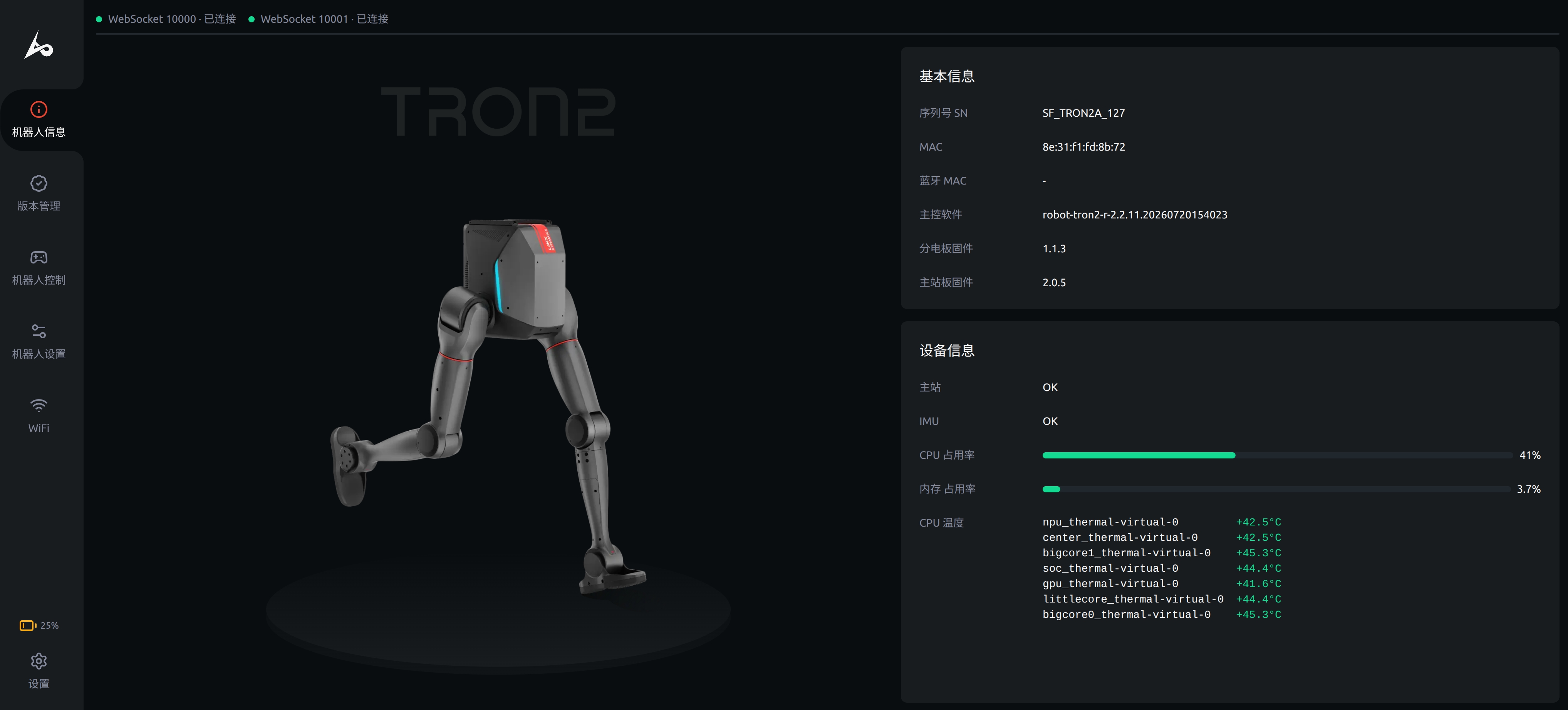
3.4 Communication Test Method
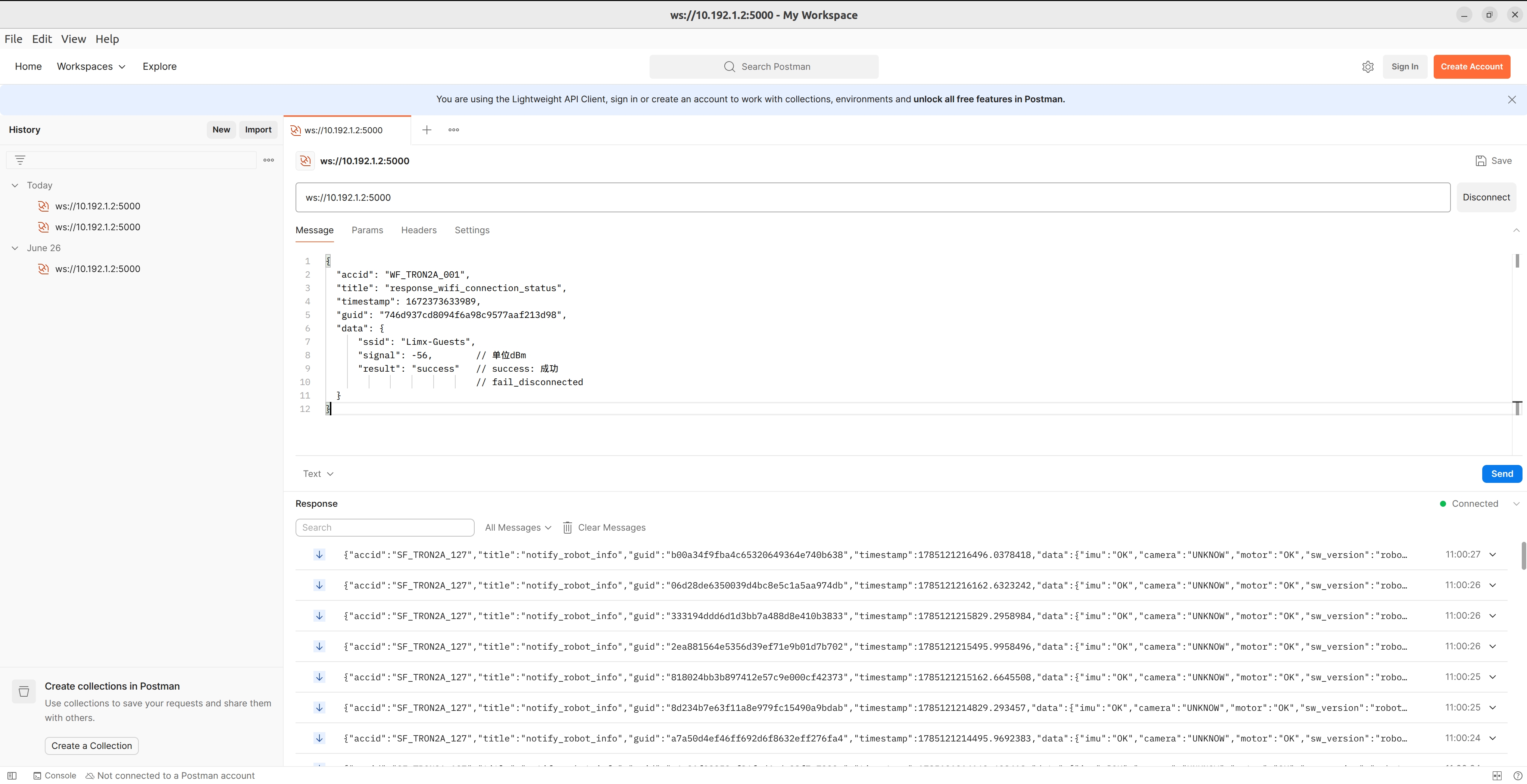
Postman is a popular API testing tool that can be used to test WebSocket interfaces. Follow these steps:
- Install Postman from the official download page.
- Open Postman and create a WebSocket request.
- Connect to the robot wireless network
- After the robot has finished booting, connect a personal computer to the robot's Wi-Fi network. Its name is usually in the format
TRON2A_xxx. - Enter the Wi-Fi password:
12345678.
- After the robot has finished booting, connect a personal computer to the robot's Wi-Fi network. Its name is usually in the format
- Enter the WebSocket address in the request URL, for example,
ws://10.192.1.2:5000. - Enter the request message in the "Message" field.
- Click "Send" to transmit the request.
- After sending the request, view the server response in the Postman response pane and verify that it matches the expected result.
3.5 Common Protocol Interface Definitions
The robot interface design follows the same process and state transitions as remote-controller operation, ensuring that call order, response timing, and state transitions strictly align with remote-controller control logic. Users can obtain an intuitive experience similar to using the remote controller through interface calls, while supporting seamless switching between the remote controller and the interfaces, to achieve unified and stable robot control.
3.5.1 Global Messages
3.5.1.1 Robot Basic Information
Basic robot information is reported once per second and contains the following fields:
- accid: robot serial number
- title: notify_robot_info
- timestamp: message transmission timestamp, in milliseconds
- guid: message guid value, uniquely identifying this message
- data: stores message content, Example:
Example:
{
  "accid": "WF_TRON2A_001",
  "title": "notify_robot_info",
  "timestamp": 1672373633989,
  "guid": "746d937cd8094f6a98c9577aaf213d98",
  "data": {
    "accid": "WF_TRON2A_001",
    "sw_version": "robot-tron2-2.0.10.20241111103012",
    "imu": "OK",    // robot IMU diagnostic information
    "camera": "OK", // robot camera diagnostic information
    "motor": "OK",  // robot motor diagnostic information
    "battery": 95,  // robot battery level
    "status": "WALK" // robot operating mode
  }
}
| Field | Description |
|---|---|
accid | robot serial number |
sw_version | robot onboard software version |
imu | robot IMU diagnostic information |
camera | robot camera diagnostic information |
motor | robot motor diagnostic information |
battery | robot battery level |
status | robot operating mode, such as STAND, WALK, SIT, DAMPING, ROTATE, STAIR, ERROR_FALLOVER(fallen), RECOVER(fall recovery in progress), ERROR_RECOVER(fall recovery failed) |
3.5.1.2 Invalid Command Message
When the robot receives a request command with an invalid format, it sends this message containing the following content:
- accid: robot serial number
- title: notify_invalid_request
- timestamp: message transmission timestamp, in milliseconds
- guid: message guid value, uniquely identifying this message
- data: stores message content
- Example:
{
  "accid": "WF_TRON2A_001",
  "title": "notify_invalid_request",
  "timestamp": 1672373633989,
  "guid": "746d937cd8094f6a98c9577aaf213d98",
  "data": "Returns the original request command content to help the client troubleshoot the problem"
}
3.5.2 Connect to a Wi-Fi Hotspot
3.5.2.1 Request: request_connect_wifi
This protocol sends a request to the robot router, instructing it to connect to a Wi-Fi hotspot with the specified SSID and return the connection result.
{
  "accid": "WF_TRON2A_001",
  "title": "request_connect_wifi",
  "timestamp": 1672373633989,
  "guid": "746d937cd8094f6a98c9577aaf213d98",
  "data": {
      "wifi_band": 0,  // Wi-Fi band: 0=5GHz, 1=2.4GHz
      "wifi_ssid": "Limx-Guests",  // Target Wi-Fi SSID (Wi-Fi name), case-sensitive and must match the actual hotspot
      "wifi_password": "LimX2024",  // Target Wi-Fi password, using WPA2-PSK encryption
      "router_admin_password": "12345678"  // robot router administrator password
  }
}
3.5.2.2 Response: response_connect_wifi
{
  "accid": "WF_TRON2A_001",
  "title": "response_connect_wifi",
  "timestamp": 1672373633989,
  "guid": "746d937cd8094f6a98c9577aaf213d98",
  "data": {
      "result": "success"  // success: success
                           // fail_no_wifi_band: Wi-Fi band not specified
                           // fail_no_wifi_ssid: SSID not specified
                           // fail_no_wifi_password: password not specified
                           // fail_no_router_admin_password: password not specified
  }
}
3.5.2.3 Notification Push: None
3.5.3 Query Wi-Fi Connection Status
3.5.3.1 Request: request_wifi_connection_status
This protocol allows the client to query the Wi-Fi connection status from the robot router. The router returns the connected SSID, signal strength, and connection result, allowing the client to monitor the device's network connection in real time. The request must include the robot router administrator password for authentication.
{
  "accid": "WF_TRON2A_001",
  "title": "request_wifi_connection_status",
  "timestamp": 1672373633989,
  "guid": "746d937cd8094f6a98c9577aaf213d98",
  "data": {
      "router_admin_password": "12345678"  // robot router administrator password
  }
}
3.5.3.2 Response: response_wifi_connection_status
After receiving the query request, the robot router returns the actual current Wi-Fi connection status for client parsing, display, or subsequent business processing.
{
  "accid": "WF_TRON2A_001",
  "title": "response_wifi_connection_status",
  "timestamp": 1672373633989,
  "guid": "746d937cd8094f6a98c9577aaf213d98",
  "data": {
      "ssid": "Limx-Guests",
      "signal": -56,        // unit: dBm
      "result": "success"   // success: success
                            // fail_disconnected
  }
}
3.5.3.3 Notification Push: None
3.5.4 Set Light Effect
3.5.4.1 Request: request_light_effect
{
  "accid": "WF_TRON2A_001",
  "title": "request_light_effect",
  "timestamp": 1672373633989,
  "guid": "746d937cd8094f6a98c9577aaf213d98",
  "data": {
    "effect": 1
  }
}
Request Parameter Description:
| Parameter Name | Type | Description |
|---|---|---|
data.effect | Number |
Light effect ID corresponding to different light display modes. The mapping is as follows: 1: STATIC_RED(static red)2: STATIC_GREEN(static green)3: STATIC_BLUE(static blue)4: STATIC_CYAN(static cyan)5: STATIC_PURPLE(static purple)6: STATIC_YELLOW(static yellow)7: STATIC_WHITE(static white)8: LOW_FLASH_RED(low-frequency flashing red)9: LOW_FLASH_GREEN(low-frequency flashing green)10: LOW_FLASH_BLUE(low-frequency flashing blue)11: LOW_FLASH_CYAN(low-frequency flashing cyan)12: LOW_FLASH_PURPLE(low-frequency flashing purple)13: LOW_FLASH_YELLOW(low-frequency flashing yellow)14: LOW_FLASH_WHITE(low-frequency flashing white)15: FAST_FLASH_RED(high-frequency flashing red)16: FAST_FLASH_GREEN(high-frequency flashing green)17: FAST_FLASH_BLUE(high-frequency flashing blue)18: FAST_FLASH_CYAN(high-frequency flashing cyan)19: FAST_FLASH_PURPLE(high-frequency flashing purple)20: FAST_FLASH_YELLOW(high-frequency flashing yellow)21: FAST_FLASH_WHITE(high-frequency flashing white)
|
3.5.4.2 Response: response_light_effect
{
  "accid": "DACH_TRON2A_001",
  "title": "response_light_effect",
  "timestamp": 1672373633989,
  "guid": "746d937cd8094f6a98c9577aaf213d98",
  "data": {
    "result": "success"  // success: success, fail_light_effect: failure
  }
}
3.5.4.3 Notification Push: None
3.5.5 Emergency Stop
Note: Must be called in idle mode; it cannot respond during motion
3.5.5.1 Request: request_emgy_stop
{
  "accid": "DACH_TRON2A_001", // robot serial number; replace it with your robot's serial number
  "title": "request_emgy_stop",
  "timestamp": 1672373633989,
  "guid": "746d937cd8094f6a98c9577aaf213d98",
  "data": {}
}
3.5.5.2 Response: response_emgy_stop
{
  "accid": "DACH_TRON2A_001",
  "title": "response_emgy_stop",
  "timestamp": 1672373633989,
  "guid": "746d937cd8094f6a98c9577aaf213d98",
  "data": {
    "result": "success"  // success: success, fail_imu: IMU error, fail_motor: motor error
  }
}