High-level · legs & wheels
3.8 Bipedal/Dual-Wheel-Leg Protocol Interface Definitions
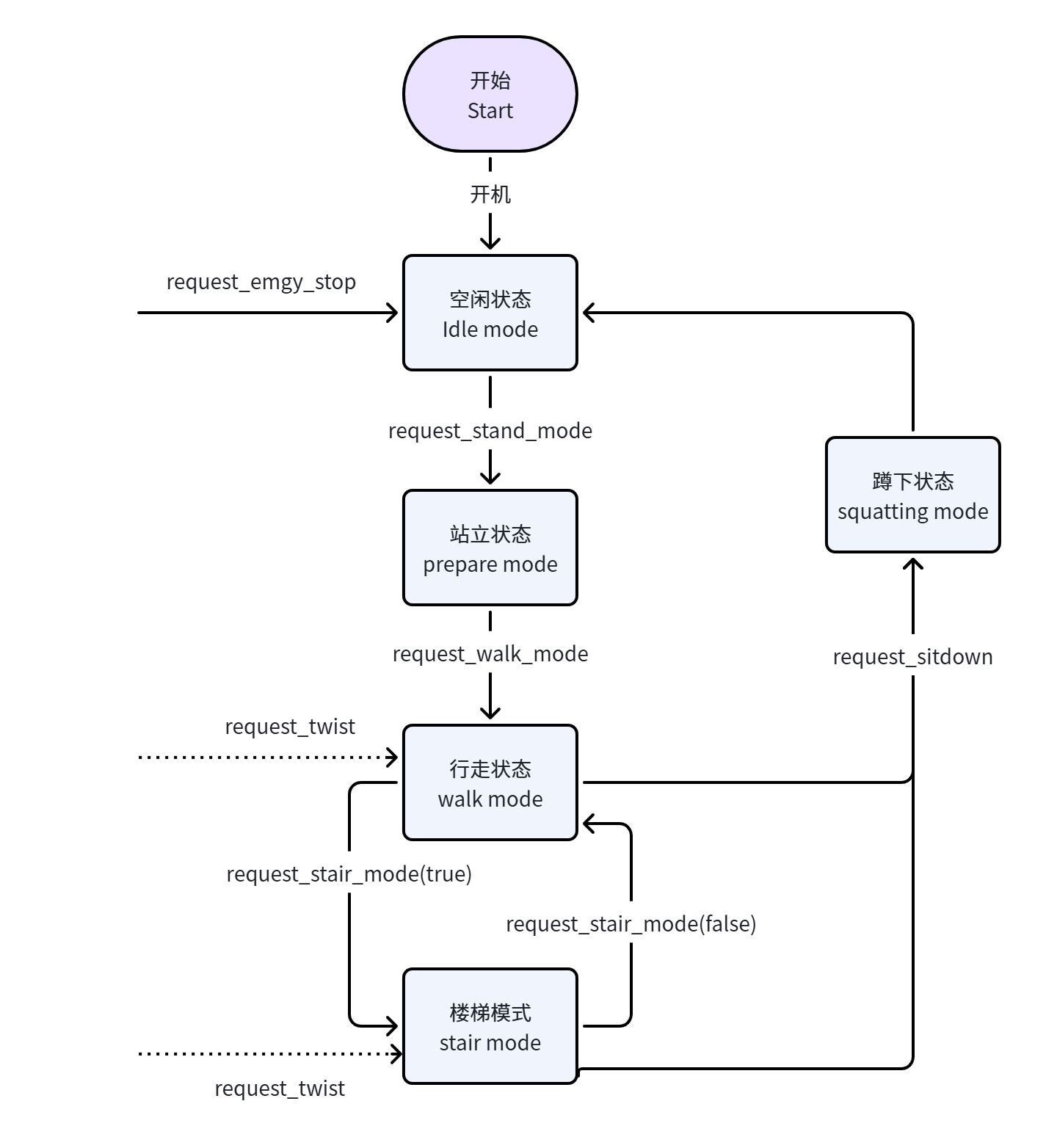
The robot interface design follows the same process and state transitions as remote-controller operation, ensuring that call order, response timing, and state transitions strictly align with remote-controller control logic. Users can obtain an intuitive experience similar to using the remote controller through interface calls, while supporting seamless switching between the remote controller and the interfaces, to achieve unified and stable robot control.
3.8.1 Stand-Up State
3.8.1.1 Request: request_stand_mode
{
  "accid": "SF_TRON2A_001",  // robot serial number; modify it to your robot serial number;
  "title": "request_stand_mode",
  "timestamp": 1672373633989,
  "guid": "746d937cd8094f6a98c9577aaf213d98",
  "data": {
  }
}
3.8.1.2 Response: response_stand_mode
{
  "accid": "SF_TRON2A_001",
  "title": "response_stand_mode",
  "timestamp": 1672373633989,
  "guid": "746d937cd8094f6a98c9577aaf213d98",
  "data": {
    "result": "success"  // success: success, fail_imu: IMU error, fail_motor: motor error
  }
}
3.8.1.3 Notification Push: notify_stand_mode
This notification is sent after the robot stands up or if the stand-up process fails.
{
  "accid": "SF_TRON2A_001",
  "title": "notify_stand_mode",
  "timestamp": 1672373633989,
  "guid": "746d937cd8094f6a98c9577aaf213d98",
  "data": {
    "result": "success"  // success: success, fail_imu: IMU error, fail_motor: motor error
  }
}
3.8.2 Walking State
3.8.2.1 Request: request_walk_mode
{
  "accid": "SF_TRON2A_001", // robot serial number; modify it to your robot serial number;
  "title": "request_walk_mode",
  "timestamp": 1672373633989,
  "guid": "746d937cd8094f6a98c9577aaf213d98",
  "data": {
  }
}
3.8.2.2 Response: response_walk_mode
{
  "accid": "SF_TRON2A_001",
  "title": "response_walk_mode",
  "timestamp": 1672373633989,
  "guid": "746d937cd8094f6a98c9577aaf213d98",
  "data": {
    "result": "success"  // success: success, fail_imu: IMU error, fail_motor: motor error
  }
}
3.8.2.3 Notification Push: notify_walk_mode
This message is sent after the robot enters walking mode or if the transition fails.
{
  "accid": "SF_TRON2A_001",
  "title": "notify_walk_mode",
  "timestamp": 1672373633989,
  "guid": "746d937cd8094f6a98c9577aaf213d98",
  "data": {
    "result": "success"  // success: success, fail_imu: IMU error, fail_motor: motor error
  }
}
3.8.3 Control Walking
3.8.3.1 Request: request_twist
Send commands at 30 Hz or higher.
- Use the following rules in sole-foot mode:
{
  "accid": "SF_TRON2A_001", // robot serial number; modify it to your robot serial number;
  "title": "request_twist",
  "timestamp": 1672373633989,
  "guid": "746d937cd8094f6a98c9577aaf213d98",
  "data": {
    "x": 0.0,   //  forward/backward velocity ratio, range[-1, 1]
    "y": 0.0,   //  lateral walking velocity ratio, range[-1, 1]
    "z": 0.0    //  rotational angular velocity ratio, range[-1, 1]
  }
}
- Use the following rules in wheel-leg mode:
{
  "accid": "WF_TRON1A_075", // robot serial number; modify it to your robot serial number;
  "title": "request_twist",
  "timestamp": 1672373633989,
  "guid": "746d937cd8094f6a98c9577aaf213d98",
  "data": {
    "x": 0.0,   //  forward/backward velocity (m/s), range[-3.0, 3.0]; Note: in stair mode, the commanded velocity must be greater than 1.5, otherwise the robot cannot climb stairs
    "y": 0.0,   //  lateral walking velocity is 0.0 (m/s); lateral movement is not supported in wheel-leg mode
    "z": 0.0    //  rotational angular velocity (rad/s), range[-1.5, 1.5]
  }
}
3.8.3.2 Response: None
3.8.3.3 Notification Push: notify_twist
This notification is sent if robot walking fails.
{
  "accid": "SF_TRON2A_001",
  "title": "notify_twist",
  "timestamp": 1672373633989,
  "guid": "746d937cd8094f6a98c9577aaf213d98",
  "data": {
    "result": "fail_motor"  // fail_imu: IMU error, fail_motor: motor error
  }
}
3.8.4 Adjust Robot Body Height
3.8.4.1 Request: request_base_height
{
  "accid": "SF_TRON2A_001", // robot serial number; modify it to your robot serial number;
  "title": "request_base_height",
  "timestamp": 1672373633989,
  "guid": "746d937cd8094f6a98c9577aaf213d98",
  "data": {
    "direction": -1  // 1: indicates raising, -1: indicates lowering
                     // Each call to this request raises or lowers the robot body height by 5 cm accordingly
  }
}
3.8.4.2 Response: response_base_height
{
  "accid": "SF_TRON2A_001",
  "title": "response_base_height",
  "timestamp": 1672373633989,
  "guid": "746d937cd8094f6a98c9577aaf213d98",
  "data": {
    "result": "success"  // success: success, fail_status: indicates that the current robot state does not allow height adjustment
  }
}
3.8.4.3 Notification Push: None
3.8.5 Sit Down
3.8.5.1 Request: request_sitdown
{
  "accid": "SF_TRON2A_001", // robot serial number; modify it to your robot serial number;
  "title": "request_sitdown",
  "timestamp": 1672373633989,
  "guid": "746d937cd8094f6a98c9577aaf213d98",
  "data": {}
}
3.8.5.2 Response: response_sitdown
{
  "accid": "SF_TRON2A_001",
  "title": "response_sitdown",
  "timestamp": 1672373633989,
  "guid": "746d937cd8094f6a98c9577aaf213d98",
  "data": {
    "result": "success"  // success: success, fail_imu: IMU error, fail_motor: motor error
  }
}
3.8.5.3 Notification Push: notify_sitdown
This notification is sent after the robot sits down or if the sit-down process fails.
{
  "accid": "SF_TRON2A_001",
  "title": "notify_sitdown",
  "timestamp": 1672373633989,
  "guid": "746d937cd8094f6a98c9577aaf213d98",
  "data": {
    "result": "success"  // success: success, fail_imu: IMU error, fail_motor: motor error
  }
}
3.8.6 Enable Stair Mode (Dual-Wheel-Leg Configuration Only)
3.8.6.1 Request: request_stair_mode
{
  "accid": "WF_TRON2A_001", // robot serial number; modify it to your robot serial number;
  "title": "request_stair_mode",
  "timestamp": 1672373633989,
  "guid": "746d937cd8094f6a98c9577aaf213d98",
  "data": {
      "enable": true  // true: enable stair mode, false: disable stair mode
  }
}
3.8.6.2 Response: response_stair_mode
{
  "accid": "WF_TRON2A_001",
  "title": "response_stair_mode",
  "timestamp": 1672373633989,
  "guid": "746d937cd8094f6a98c9577aaf213d98",
  "data": {
    "result": "success"  // success: success, fail_imu: IMU error, fail_motor: motor error
  }
}
3.8.6.3 Notification Push: None
3.8.7 Emergency Stop
3.8.7.1 Request: request_emgy_stop
{
  "accid": "SF_TRON2A_001", // robot serial number; modify it to your robot serial number;
  "title": "request_emgy_stop",
  "timestamp": 1672373633989,
  "guid": "746d937cd8094f6a98c9577aaf213d98",
  "data": {}
}
3.8.7.2 Response: response_emgy_stop
{
  "accid": "SF_TRON2A_001",
  "title": "response_emgy_stop",
  "timestamp": 1672373633989,
  "guid": "746d937cd8094f6a98c9577aaf213d98",
  "data": {
    "result": "success"  // success: success, fail_imu: IMU error, fail_motor: motor error
  }
}
3.8.7.3 Notification Push: None
3.8.8 Enable IMU Data
3.8.8.1 Request: request_enable_imu
This function enables IMU data push. After enabling it, the system actively pushes IMU data.
{
  "accid": "SF_TRON2A_001", // robot serial number; modify it to your robot serial number;
  "title": "request_enable_imu",
  "timestamp": 1672373633989,
  "guid": "746d937cd8094f6a98c9577aaf213d98",
  "data": {
      "enable": true  // true: enable IMU, false: disable IMU
  }
}
3.8.8.2 Response: response_enable_imu
{
  "accid": "SF_TRON2A_001",
  "title": "response_enable_imu",
  "timestamp": 1672373633989,
  "guid": "746d937cd8094f6a98c9577aaf213d98",
  "data": {
    "result": "success"  // success: success, fail_imu: IMU
  }
}
3.8.8.3 Notification Push: notify_imu
After IMU data is enabled, the system actively pushes messages containing IMU status.
{
  "accid": "SF_TRON2A_001",
  "title": "notify_imu",
  "timestamp": 1672373633989,
  "guid": "746d937cd8094f6a98c9577aaf213d98",
  "data": {
      "euler": [0.0, 0.0, 0.0],     // Euler angles [roll, pitch, yaw] in degrees
      "acc": [0.0, 0.0, 0.0],       // acceleration [x, y, z] in m/s²
      "gyro": [0.0, 0.0, 0.0],      // gyroscope angular velocity [x, y, z] in rad/s
      "quat": [0.0, 0.0, 0.0, 0.0]  // quaternion [w, x, y, z]
  }
}
3.8.9 Fall Recovery
3.8.9.1 Request: request_recover
After the robot falls, this interface can be called to make the robot get up automatically and recover to walking mode.
{
  "accid": "SF_TRON2A_001", // robot serial number; modify it to your robot serial number;
  "title": "request_recover",
  "timestamp": 1672373633989,
  "guid": "746d937cd8094f6a98c9577aaf213d98",
  "data": {}
}
3.8.9.2 Response: response_recover
{
  "accid": "SF_TRON2A_001",
  "title": "response_recover",
  "timestamp": 1672373633989,
  "guid": "746d937cd8094f6a98c9577aaf213d98",
  "data": {
    "result": "success"  // success: command received successfully; start recovery and get-up, fail_no_fallover: the robot has not fallen
  }
}
3.8.9.3 Notification Push: notify_recover
This message is pushed after recovery and get-up are completed.
{
  "accid": "SF_TRON2A_001",
  "title": "notify_recover",
  "timestamp": 1672373633989,
  "guid": "746d937cd8094f6a98c9577aaf213d98",
  "data": {
    "result": "success"
  }
}
Possible values for result are success (fall recovery succeeded) and fail_recover (fall recovery failed).