Overview & specifications
本页介绍双轮足自主回充基座的简介、功能特性、物料清单、产品参数与部件及接口示意图,内容搬运自 raw/tron-2/TRON2_Auto_Recharge_Base_User_Manual-zh.md §1。该基座为配件,仅适配 TRON2 双轮足形态机器人。
1.1 简介
TRON2 自主回充基座是为 TRON2 双轮足形态机器人配套提供的接触式自动回充解决方案。基座集回充基座硬件、近场自主上桩算法、充电管理与 SDK 接口于一体,使机器人能够自主完成"返桩—对接—充电—离桩"的全闭环,无需人工插拔充电。
1.2 功能特性
-
接触式充电,充电触点位于回充基座顶部,与机器人机身底部触点对应。
-
配备导向槽/导轨等物理引导机构,辅助机器人精确就位。
-
近场自主上桩算法:在回充基座前 200~650mm 范围内自主识别、定位、移动并对接回充基座。
-
支持暗光场景回充定位;需要时由回充基座照明辅助,回充结束自动熄灭。
-
充电全过程状态监控与异常处理;充满自停并保持满电。
-
完善的电气安全保护:防电弧设计、短路保护、反接保护、过压、过流、非 TRON2 充电保护。
-
提供 SDK 接口:开始回充、取消回充、离开回充基座、电池信息查询、回充状态查询、异常上报。
-
蓝牙 ID 配对机制,支持多桩场景下的精确指定。
1.3 物料清单
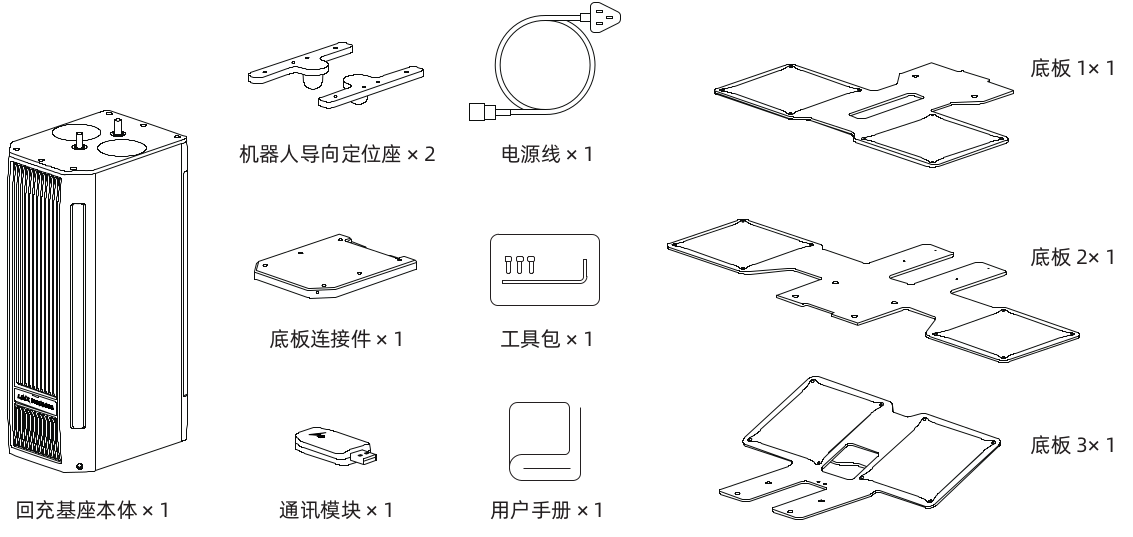
实际装箱清单以随机附带清单为准;开箱后请核对,如有缺失或破损请联系售后。
1.4 产品参数
| 规格类型 | 规格项 | 参数 |
|---|---|---|
| 基本信息 | 适配机型 | 仅适配 TRON2 双轮足形态 |
| 适用地面 | 平整水平地面 | |
| 整机尺寸 | 600 × 721 × 423 mm | |
| 机器人上桩后尺寸 | 600 × 721 × 692 mm | |
| 材质 | 钢、铝合金、铜、工程塑料 | |
| 功能性能 | 自主回充算法 | 支持 |
| 暗光回充 | 支持 | |
| 回充起效范围 | 距离范围:200–650 mm 角度范围:回充基座正面 180° 范围内 | |
| 回充平均耗时 | ≤30 s | |
| SDK 接口 | 提供开始回充、离开充电桩、电池信息、充电状态、异常上报等接口 | |
| 电气参数 | 额定输入电压 | 100–240V |
| 最大输入电流 | 8A | |
| 最大输出电压 | 54.2V | |
| 最大输出电流 | 10A | |
| 充电时长 (15~25°C 环境温度测试) | 20%→80% 约 31 min 20%→100% 约 66min | |
| 安全保护 | 反极性保护 | 当电池的正负极反向连接到充电器输出时,充电器自动关闭 |
| 输出短路保护 | 当充电器输出发生短路时,充电器将自动关闭 | |
| 输出过压保护 | 当 DC 输出电压 > 1.05 × Vout,充电器关闭输出 | |
| 输出过流保护 | 当充电器输出电流 > 1.1 × Iout,充电器关闭输出 | |
| 防电弧保护 | 通过微动开关检测充电触点对接成功后再通电,不接触不通电 | |
| 其他 | 保修期 | 12 个月 |
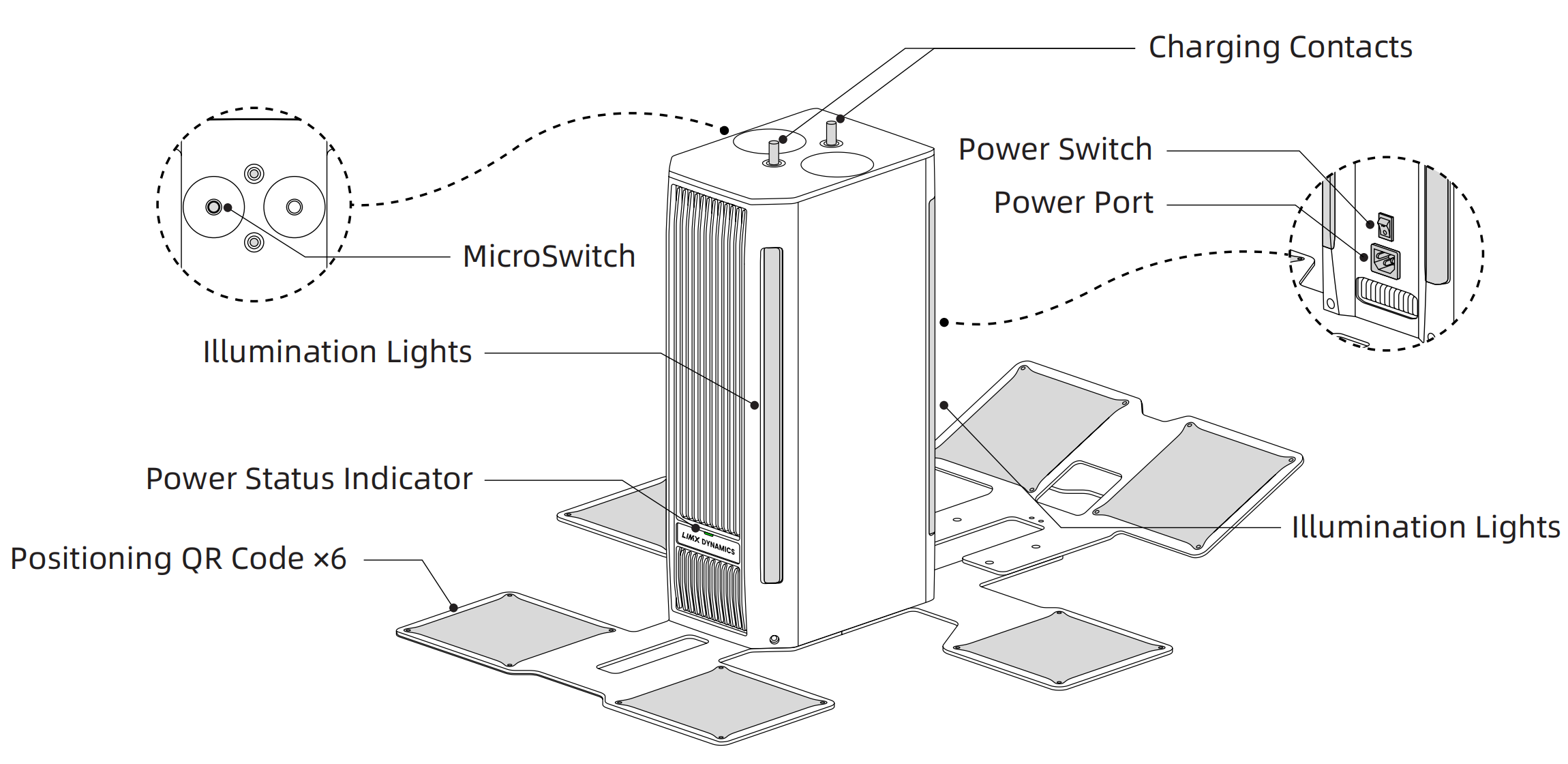
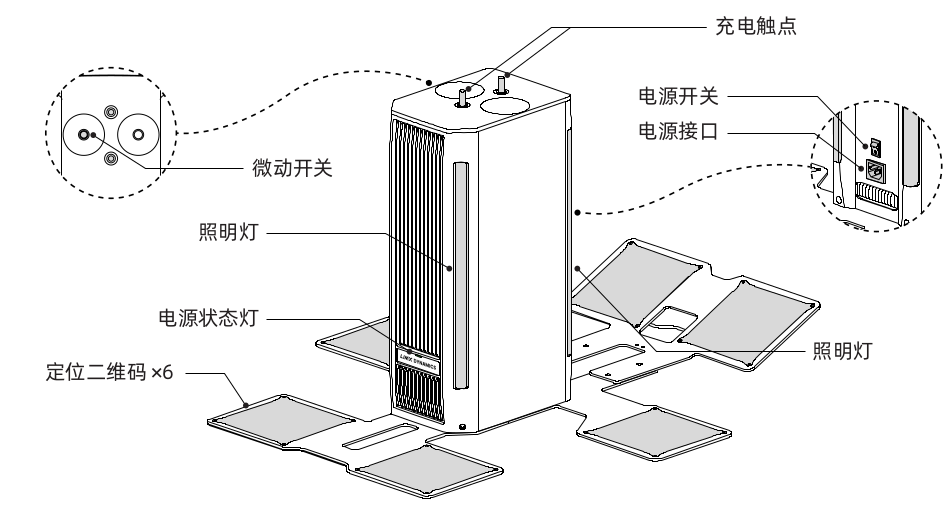
1.5 基座部件及接口示意图
Safety and Responsibility Guidelines
The copyright and ownership of this manual belong to the manufacturer and its affiliates (collectively referred to as "the manufacturer"). Without written authorization from the manufacturer, no individual or organization may copy, scan, store, distribute, reprint, sell, transfer, modify, or otherwise use all or part of this manual for themselves or others. This manual and its contents are intended only for operating and using this product and may not be used for any other purpose.
To avoid illegal acts, possible injury, and losses, please strictly observe the following requirements:
-
Read this manual carefully before using the product. Make sure you understand the safety information and your responsibilities as an operator.
-
By using this product, you acknowledge that you have read and understood these requirements. Always operate the product in accordance with this manual and applicable laws.
-
This product is not a toy and is not intended for use by anyone under 18 years of age. Keep it out of the reach of children.
-
During docking, keep hands, feet, and foreign objects out of the docking area. To the fullest extent permitted by applicable law, the manufacturer is not liable for injury or loss caused by misuse or failure to follow these instructions.
-
Installation, wiring, and maintenance of the charging dock must be performed by qualified personnel. Do not disassemble the enclosure, circuitry, or internal components unless you are authorized and qualified to do so. Unauthorized disassembly, modification, or repair may result in injury or damage, may void the warranty, and, to the fullest extent permitted by applicable law, is performed at the user's own risk.
-
Use only the original power cord and adapter. Verify that the supply voltage is within the rated input range of 100–240 V AC. Do not short-circuit, disable, or bypass this safety mechanism. Reverse polarity, short-circuit, overvoltage, and overcurrent protection automatically disable the output when a fault is detected. If you notice smoke, an unusual odor, overheating, or enclosure damage, disconnect the power immediately, stop using the product, and contact the manufacturer Customer Support.
-
Do not use or store the product in extreme temperatures or in areas exposed to corrosive chemicals, standing water, excessive humidity, flammable or explosive materials, or strong electromagnetic interference. Install the charging dock indoors on a dry, level, stable, and non-slip surface, and secure it in place. Do not move the dock while it is operating. Disconnect the power before moving it. Avoid prolonged storage or operation in direct sunlight. Damage caused by use or storage outside these conditions may not be covered by the warranty, except where coverage is required by applicable law.
-
Keep the charging contacts clean and dry. Do not allow metal objects or standing water to contact them, as this may cause a short circuit. Do not cover the Status Indicator Light or QR Codes.
-
Do not use the charging dock with any device other than a TRON 2 robot in the Wheeled-legs Configuration.
-
Normal wear of components and charging contacts, and normal battery aging, are not considered product defects and are not covered by the warranty unless otherwise required by applicable law.
-
Do not use this product for any unlawful or prohibited end use, including support for terrorism; use in nuclear facilities; or the research, development, production, design, or use of chemical, biological, or other weapons of mass destruction.
-
Do not purchase, receive, or use this product where doing so is prohibited by applicable trade restrictions or sanctions.
-
Comply with all laws, regulations, and other requirements that apply where the product is installed or used.
-
Do not export, re-export, or transfer this product, its software, or related technology in violation of applicable export control laws and regulations.
-
Use this product only for lawful and legitimate purposes.
-
The manufacturer may revise this manual and these terms from time to time. Any revision applies only to the extent permitted by applicable law. Nothing in this manual excludes or limits rights or remedies that cannot lawfully be excluded or limited.
1.1 Introduction
The TRON 2 Auto-Recharge Base is a contact-based charging solution for the TRON 2 robot in the Wheeled-legs Configuration. It combines dock hardware, near-field autonomous docking, charge management, and SDK interfaces, allowing the robot to complete the entire return, docking, charging, and undocking cycle without manual connection of a charging cable.
1.2 Features
-
Contact-based charging: the charging contacts on top of the dock align with the contacts on the underside of the robot.
-
Uses guide slots, rails, and other physical guidance structures to help the robot align precisely.
-
Near-field Autonomous Charging Algorithm: within 200–650 mm in front of the dock, the robot autonomously detects, locates, approaches, and docks with the charging dock.
-
Supports Low-Light Charging; the dock's illumination lights assist when needed and turn off automatically once docking is complete.
-
Monitors charging status and detects faults throughout the charging process. Charging stops automatically when the battery is full, and the dock maintains a full charge while the robot remains docked.
-
Provides comprehensive electrical safety features, including Anti-Arc Protection, Output Short-Circuit Protection, Reverse Polarity Protection, Output Overvoltage Protection, Output Overcurrent Protection, and protection against charging devices other than TRON 2.
-
Provides SDK interfaces for starting a charging cycle, canceling a charging cycle, leaving the dock, querying battery information, querying charging status, and reporting faults.
-
Uses a Bluetooth ID pairing mechanism to precisely target a specific dock in multi-dock environments.
1.3 Packing List
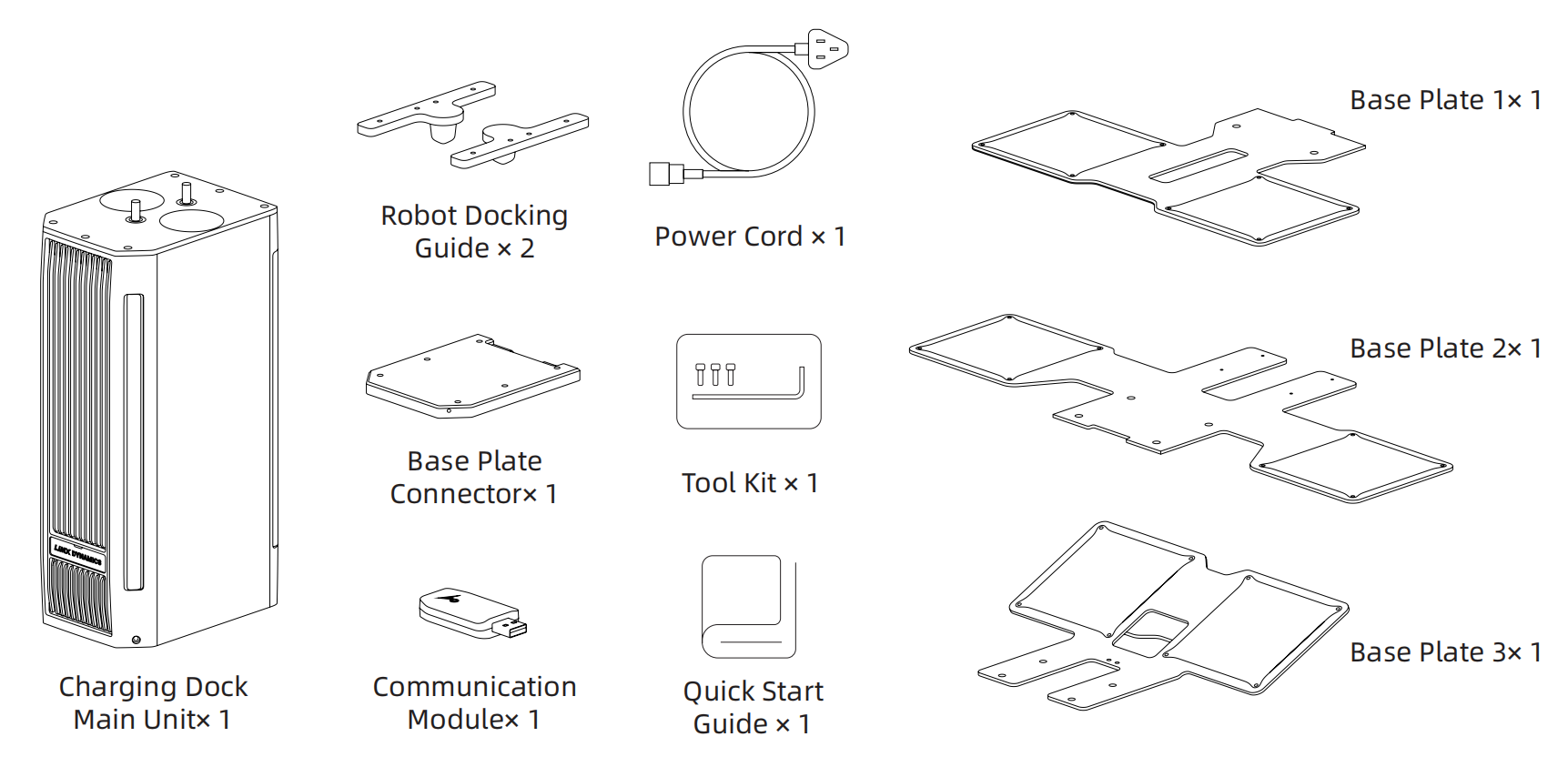
Refer to the packing list included in the box for the actual contents. After unpacking, check the contents; if anything is missing or damaged, contact customer support.
1.4 Specifications
| Category | Item | Specification |
|---|---|---|
| General Information | Compatible Model | TRON 2 robot in the Wheeled-legs Configuration only |
| Applicable Ground | Flat, level ground | |
| Overall Dimensions | 600 × 721 × 423 mm | |
| Dimensions with Robot Docked | 600 × 721 × 692 mm | |
| Material | Steel, aluminum alloy, copper, engineering plastic | |
| Features & Performance | Autonomous Charging Algorithm | Supported |
| Low-Light Charging | Supported | |
| Effective Docking Range | Distance: 200–650 mm Angle: within the 180° area in front of the charging dock | |
| Average Docking Time | ≤ 30 s | |
| SDK Interfaces | Provides interfaces for starting a charging cycle, leaving the dock, battery information, charging status, and fault reporting | |
| Electrical Parameters | Rated Input Voltage | 100–240 V AC |
| Maximum Input Current | 8 A | |
| Maximum Output Voltage | 54.2 V | |
| Maximum Output Current | 10 A | |
| Charging Time (tested at an ambient temperature of 15–25 °C) | 20% → 80%: approx. 31 min 20% → 100%: approx. 66 min | |
| Safety Protections | Reverse Polarity Protection | The charger automatically shuts off if the battery's positive and negative terminals are connected in reverse to the charger output |
| Output Short-Circuit Protection | The charger automatically shuts off if the output is short-circuited | |
| Output Overvoltage Protection | The charger shuts off the output when the DC output voltage exceeds 1.05 × Vout | |
| Output Overcurrent Protection | The charger shuts off the output when the output current exceeds 1.1 × Iout | |
| Anti-Arc Protection | The charging contacts are energized only after the MicroSwitch confirms that they are properly engaged | |
| Other | Warranty Period | 12 months |
1.5 Dock Components and Interfaces